---
title: "Viewing Archival Policy Sessions"
description: "For each performed archival operation, Veeam Backup for Salesforce starts a new session according to the created archival polices, and stores the session details in the product database."
canonical: "https://helpcenter.veeam.com/docs/backup_salesforce/userguide/viewing_archival_sessions.html"
breadcrumb: "User Guide > Performing Salesforce Archiving > Viewing Archival Policy Details > Viewing Archival Policy Sessions"
dateModified: "2026-10-16"
---
# Viewing Archival Policy Sessions
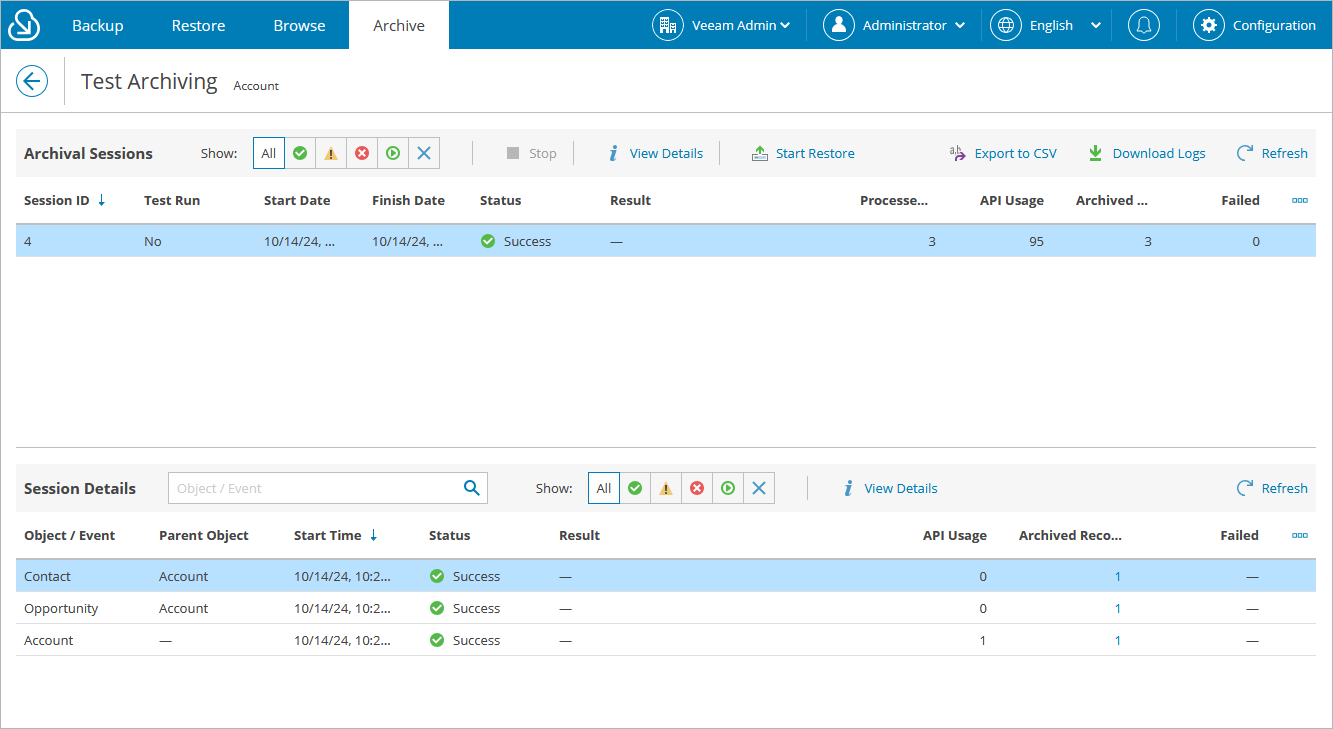
For each performed archival operation, Veeam Backup for Salesforce starts a new session according to the created archival polices, and stores the session details in the product database. You can track real-time statistics of all running and completed operations on the **Archive** tab. To view the full list of tasks executed during an operation, click the link in the **Status** column.
The **Archival Sessions** section of the **Archive** tab displays information on all sessions of the archival policy. Each session is described with the following set of properties:
- **Session ID** — the ID assigned to the session.
- **Test Run** — the indication whether the policy was launched in the [test mode](add_archival_policy_options.md#test_mode).
- **Start** **Date** — the date and time when the session started.
- **Finish Date** — the date and time when the session ended.
- **Status** — the current status of the session.
- **Result** — the explanation why Veeam Backup for Salesforce failed to process the records (applies only to sessions with the *Warning* and *Error* statuses).
- **Processed Objects** — the total number of objects processed during the session.
- **API Usage** — the total number of API calls sent during the session.
- **Archived Records** — the total number of Salesforce records archived during the session.
- **Failed** — the total number of Salesforce records that Veeam Backup for Salesforce failed to process.
::: note
You can restore records archived during a specific archival session. To do that, choose the necessary session in the **Archival Sessions** section, click **Start Restore** and complete the **Restore Records** wizard as described in section [Restoring Records](restore_record_create.md).
:::
The **Session Details** section of the **Archive** tab displays information on all objects included in a specific policy session. Each object is described with the following set of properties:
- **Object / Event** — the name of the archived object.
- **Parent Object** — the name of a parent object to which the archived object is linked (if any).
Veeam Backup for Salesforce will display only those parent objects that are linked to the archived object using master-detail relationships.
- **Start Time** — the date and time when Veeam Backup for Salesforce started a new task to process the object.
- **Status** — the current status of the task.
- **Result** — the explanation why Veeam Backup for Salesforce failed to process the records (applies only to tasks with the *Warning* and *Error* statuses).
- **API Usage** — the total number of API calls sent during the task.
- **Archived Records** — the total number of Salesforce records archived during the task.
- **Failed** — the total number of Salesforce records that Veeam Backup for Salesforce failed to process.
::: tips
- If you want to view logs of a specific archival session, select the session and click **Download Logs**. Veeam Backup for Salesforce will collect the session logs and save them as a single .ZIP archive to the default download folder on the local machine.
- If you want to view all archived records for a specific object, choose the necessary object in the **Session Details** section and click the link in the **Archived Records** column.
:::
[](images/archival_policy_session_details.png){.toggle scale=60}