Support Information
If you have any questions or issues with Veeam Plug-in for Kasten, you can search for a resolution on Veeam R&D Forums or submit a support case in the Veeam Customer Support Portal.
|
Important |
Veeam Customer Support does not assist with issues related to the Veeam Kasten platform, management of Kubernetes containers and Veeam Kasten policies. You must contact Veeam Kasten support. |
When you submit a support case, it is recommended that you provide information on the installed products to the Veeam Customer Support Team. Product logs contain this information.
To export logs, do the following:
- From the main menu of the Veeam Backup & Replication console, select Help > Support Information.
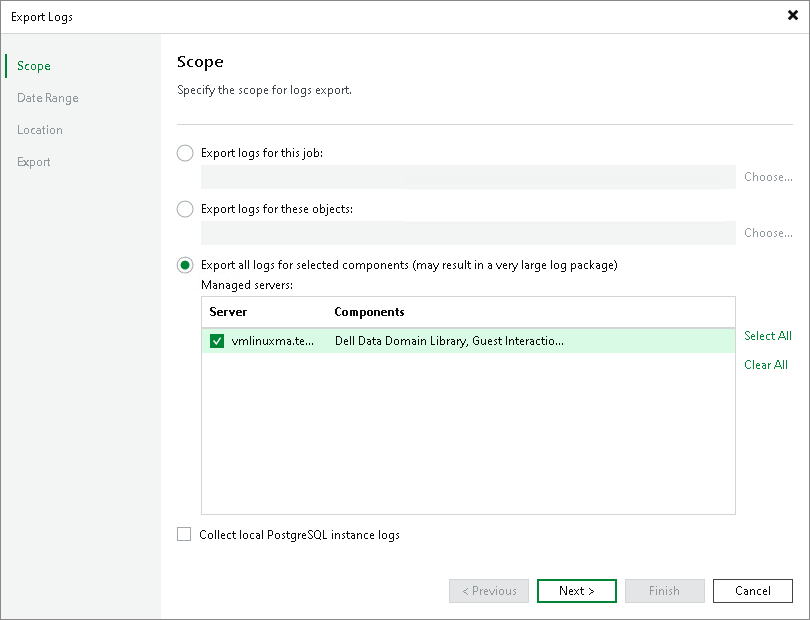
- At the Scope step of the Export Logs wizard, select Export all logs for selected components.
- In the Managed servers list, select the Veeam Backup & Replication server and other components for which you want to export logs.
- Complete the wizard as described in the Exporting Logs section in the Veeam Backup & Replication User Guide.
|
Important |
|
In the Export Logs wizard, you cannot export logs for separate Kasten policies and backup files. |