This is an archive version of the document. To get the most up-to-date information, see the current version.
Step 4. Specify Restore Options
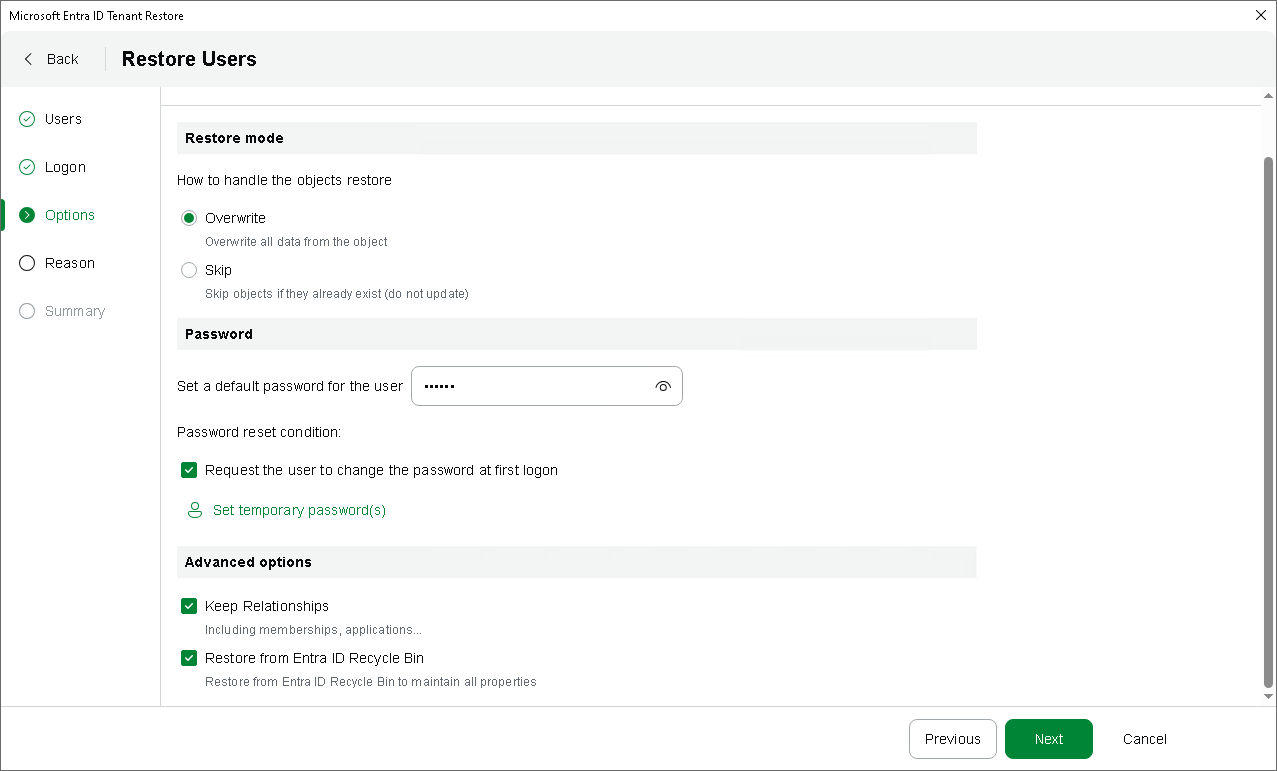
At the Options step of the wizard, configure the restore options, such as how to restore users, default password and others:
- In the Restore mode section, specify whether to overwrite users or skip restore of the already existing users.
When you select the overwrite option, Veeam Backup & Replication updates fields present in the backup. If a field in the backup is empty, it will be restored as empty. However, Veeam Backup & Replication does not update read-only fields (the ID, creation date and so on) and fields that are not present in the backup.
- To set the default password for all users, specify it in the Set a default password for the user field.
- To set a password for each user, click Set temporary password(s). In the Set temporary passwords window, specify your own passwords or use auto-generation.
- To force the restored users to change their password after the first logon, select Request the user to change the password at first logon.
|
Tip |
|
Consider the following:
|
- In the Advanced options section, configure the following:
- To restore relationships of users within the current tenant, click the Keep Relationships check box. Veeam Backup & Replication will restore the following relationships: assigned roles, group memberships, group ownerships, admin unit memberships, application ownerships, user manager and direct reports for the user. Note that Veeam Backup & Replication restores only relationships — if a role, group or admin unit does not exist, it will not be restored.
If you have selected to overwrite the users, Veeam Backup & Replication will restore the relationships from the backup and will remove the relationships not present in the backup.
- To restore users from the Entra ID recycle bin instead of the backup, click the Restore from Entra ID Recycle Bin check box. If users exist in both the recycle bin and the backup, they will be restored from the recycle bin and will preserve their object IDs. Otherwise, users will be restored from the backup and get new object IDs.