Adding Tabs and Buttons
After a Salesforce object is added to Veeam Data Cloud Salesforce Extension and a Salesforce Administrator configures the necessary layouts for this object, the Administrator must also create the Archived Records button or the Archived Records tab (or both):
- Archived Records button — allows you to view all archived records of the added object. To be able to use this button, do the following:
- Create the button as described in this Salesforce KB article. When choosing a content source, select the URL option and specify /lightning/n/vbsf__ArchiveManagement?vbsf__objectApiName={ObjectName} in the text field; when choosing a label name, specify Archived Records.
- Add the created button to the List View Button layout as described in this Salesforce KB article.
|
Note |
|
By default, the Archived Records button is added automatically for some standard objects (for example, Case and Opportunity) during product installation. |
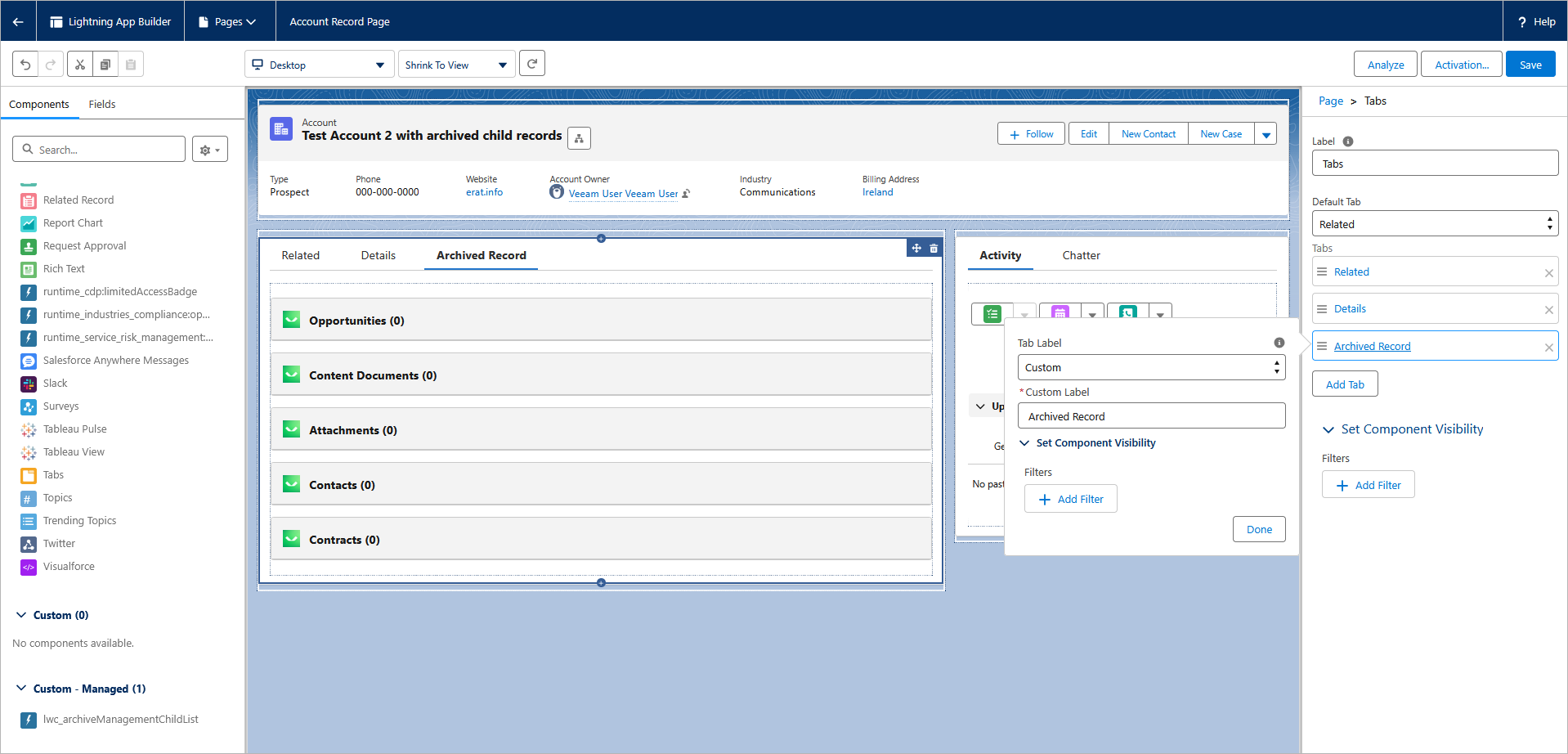
- Archived Records tab — allows you to view archived child records of the added object. To be able to use this tab, do the following:
- Open the object manager and click the necessary object.
- Switch to Lightning Record Pages.
- In the list of all pages created for the object, click the necessary record page and then edit it as described in this Salesforce KB article. When creating a new tab, select the Custom label and then drag and drop the lwc_archiveManagementChildList custom web component to the canvas; when choosing a label name, specify Archived Records.