

Generally, the process of backup and restore includes the following stages:
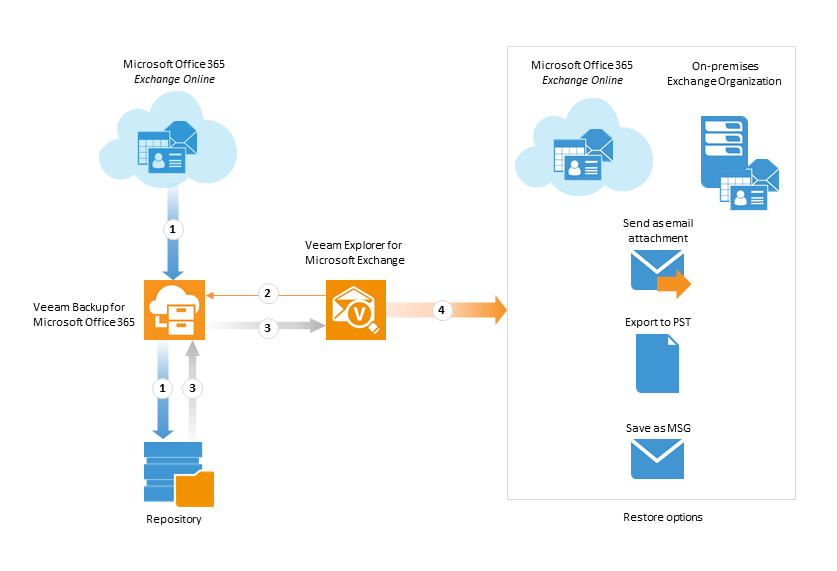
- Veeam Backup for Microsoft Office 365 gathers mailbox data from Exchange Online using Exchange Web Services and PowerShell, and stores it in the repository; data is transferred using SSL. To carry out these operations automatically, an administrator creates and schedules a backup job. Each successful job run creates a restore point where the corresponding state of the mailbox datastore is kept.
2,3 A user selects the mailbox database state to work with - as of the latest restore point, or as of the certain point in time. This datastore is automatically added to the Veeam Explorer for Microsoft Exchange scope. This way, it becomes available for browsing and restore of mailbox items and folders.
- Then the user can utilize browsing, searching and restore capabilities of Veeam Explorer for Microsoft Exchange. They include:
- Export of mailboxes, folders and items as Personal Folder Files (.pst)
- Saving mailbox items as Microsoft Exchange Mail Documents (.msg)
- Sending mailboxes, folders and items as attachments via email
- Restoring mailboxes, folders and items to Exchange Online or on-premises Exchange Organization
Send feedback | Updated on 2/6/2017