

Installed applications will appear in the list of application programs and on your Desktop. In the Control Panel > Programs and Features they will appear as Veeam Backup for Microsoft Office 365 and Veeam Backup & Replication, as Veeam Explorer is also a part of it.
If you have these components on different machines, you can use the application launcher in the list of application programs to start Veeam Backup for Microsoft Office 365 remotely from the machine where Veeam Explorer for Exchange was installed:
- Specify the server name or IP address, service port number (default is 9191) and the user account that be used to access that server.
- You can select to Use Windows credentials if current account has sufficient permissions, that is, local administrative rights on the target machine.
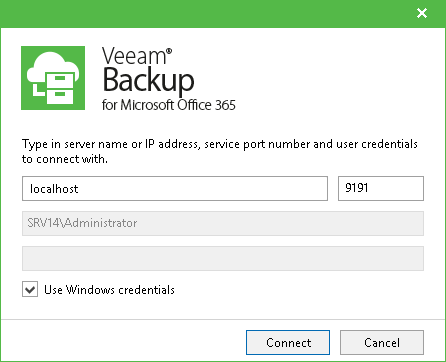
You can also start Veeam Backup for Microsoft Office 365 from a remote machine, using the command line with the following parameters:
- <path_to_UI> - path to the UI component, by default C:\Program Files\Veeam\Backup365\Veeam.Archiver.Shell.exe
- /host=<server> - name or IP address of the machine where Veeam Backup for Microsoft Office 356 was installed
Make sure that current account has local administrative rights on the machine where you want to start the program.
Remember to install the license, as described here.