

To manage the jobs configured for all organizations added to the scope, switch to the Jobs tab and select the Organizations node (root) of the navigation tree; to manage the jobs configured for a single organization, select its node in the navigation tree. Available jobs will be displayed in the right pane. Here you can see each job name, status, statistical details, last backup date and time and new restore point that were created. The following commands can be used for the backup jobs:
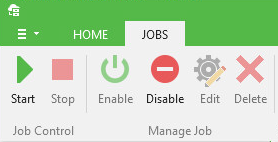
- Start or Stop selected job.
- Enable or Disable selected job.
- Edit job settings.
- Delete the job.
Note: |
|
- Explore - run Veeam Explorer for Microsoft Exchange to explore the content of restore point created by the job. Here you can select any of the following:
- Explore latest - use this command to launch Veeam Explorer for the latest restore point
- Explore point in time - use this command to launch Veeam Explorer for the point in time of your choice. Use the calendar control to select from the successfully created restore point (they will be highlighted).
For more information on Explore command, see the next section.
To view detailed job statistics, select the job you need and examine the information in the lower pane on the right. You can also examine only successfully completed jobs or those completed with errors during the Last 24 hours.