Veeam Monitoring
The Veeam Monitoring dashboard displays aggregated information about jobs related to your Veeam Backup & Replication servers. Specific widgets also display event statistics.
Note |
|
Consider the following:
|
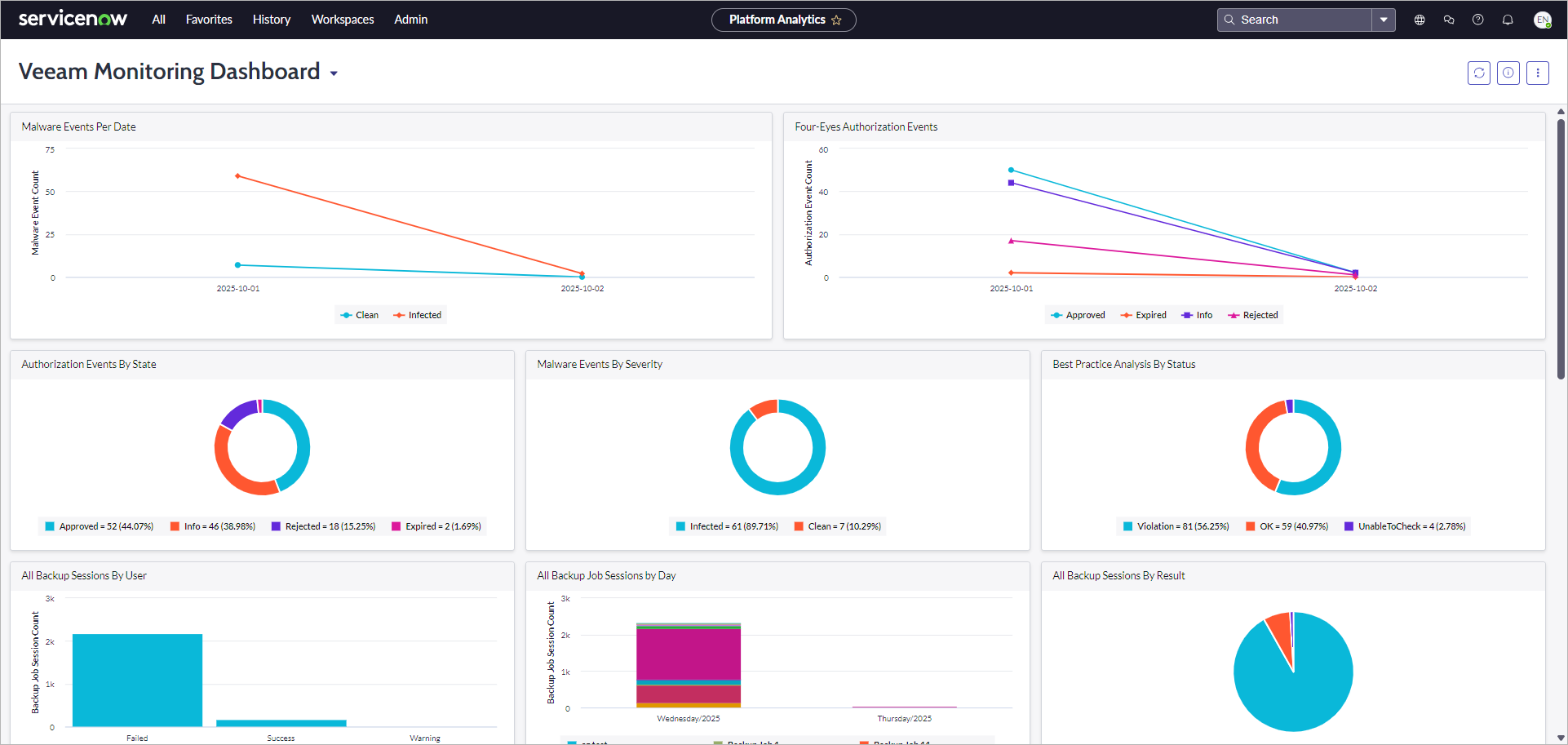
The dashboard includes the following widgets:
|
Widget |
Description |
|---|---|
|
Alarms by Day |
A colored stacked bar chart displaying the breakdown of Veeam ONE triggered alarms by day. By default, the widget displays data for the last 30 days. |
|
Alarms by Status |
A pie chart displaying the breakdown of Veeam ONE triggered alarms by status. By default, the widget displays data for the last 30 days. |
|
Malware Events by Day |
A colored graph displaying the breakdown of malware events by day. By default, the widget displays data for the last 7 days. |
|
Four-Eyes Authorization Events by Day |
A colored graph displaying the breakdown of four-eyes authorization events by day. By default, the widget displays data for the last 7 days. |
|
Four-Eyes Authorization Events by State |
A pie chart displaying the breakdown of four-eyes authorization events by state. By default, the widget displays data for the last 30 days. |
|
Malware Events by Status |
A pie chart displaying the breakdown of malware events by severity level. By default, the widget displays data for the last 30 days. |
|
Security & Compliance Analyzer Results by Status |
A pie chart displaying the breakdown of Security & Compliance Analyzer scan results by status. By default, the widget displays data for the last 30 days. |
|
All Backup Job Sessions per User |
A colored stacked bar chart displaying the breakdown of backup job sessions by user. By default, the widget displays data for the last 30 days. |
|
All Backup Job Sessions by Day |
A colored stacked bar chart displaying the breakdown of backup job sessions by day. By default, the widget displays data for the last 30 days. |
|
All Backup Job Sessions by Result |
A pie chart displaying the breakdown of backup job sessions by state. By default, the widget displays data for the last 30 days. |
|
All Unstructured Job Sessions per User |
A colored stacked bar chart displaying the breakdown of file backup job sessions per user. By default, the widget displays data for the last 30 days. |
|
All Unstructured Job Sessions by Day |
A colored stacked bar chart displaying the breakdown of file backup job sessions by day. By default, the widget displays data for the last 30 days. |
|
All Unstructured Job Sessions by Result |
A pie chart displaying the breakdown of file backup job sessions by state. By default, the widget displays data for the last 30 days. |
|
All Application Events with High Risk Level |
The total amount of application events with the High risk level. By default, the widget displays data for the last 24 hours. |
|
All Application Events by Risk Level |
A pie chart displaying the breakdown of application events by risk level. By default, the widget displays data for the last 30 days. |
|
All Application Events by Type |
A colored stacked bar chart displaying the breakdown of application events by type. By default, the widget displays data for the last 30 days. |
To view detailed information on specific data, click a value on a widget. A table with filtered results will be opened.