Configuring File Backup Job Templates
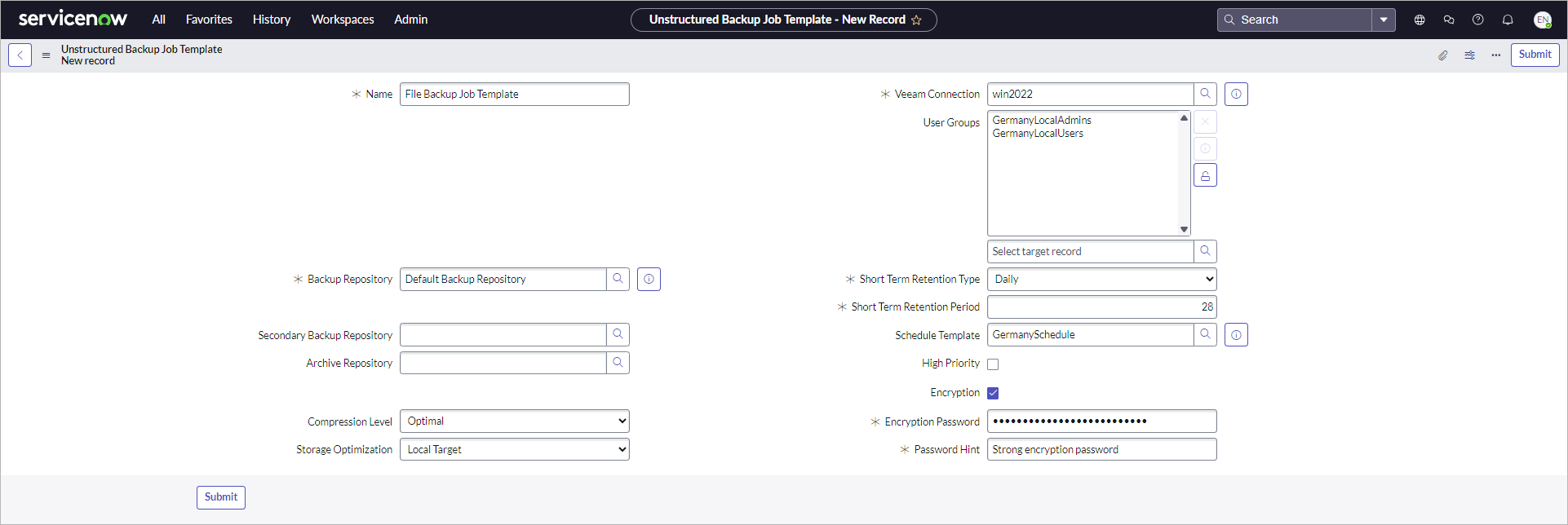
To create file backup jobs in Veeam App for ServiceNow, you need to configure job templates first. To do this, perform the following steps:
- Click All > Veeam > Unstructured Data > Job Templates.
- Click New.
- Specify the name of the template.
- In the Veeam Connection field, select the Veeam Backup & Replication server on which you plan to create jobs with this template.
- Fill in mandatory job settings and the optional ones if required. For more information on all job settings, see the Creating File Backup Jobs section in the Veeam Backup & Replication User Guide.
Note
For scheduled jobs, specify a schedule template in the Schedule Template field. For more information, see Configuring Schedule Templates.
- To allow a specific user group to use this template, unlock the User Groups field and select a user group from the list.
- Click Submit.