Managing Backup Object Events
Veeam App for ServiceNow allows you to monitor backup objects collected from your Veeam Backup & Replication servers and create incidents based on specific rules.
Viewing Backup Objects
To view aggregated information on backup objects and task sessions within these objects, click All > Veeam > Inventory > Backup Objects. For more information on data collection and data update mechanisms, see Viewing Inventory.
To view detailed information on a backup object, click the backup object name.

Creating Rules
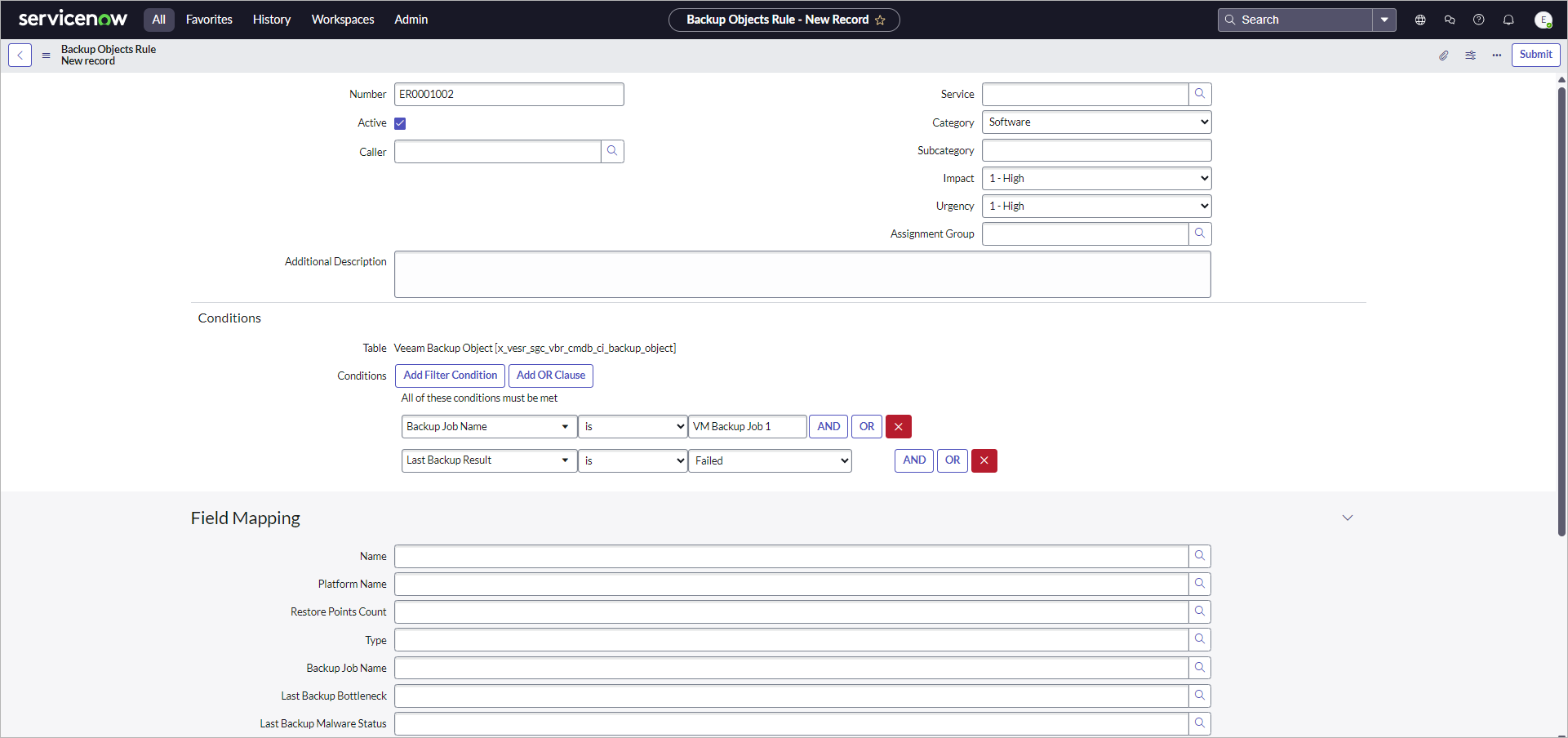
To create a rule that will trigger an incident, perform the following steps:
- Click All > Veeam > Audit > Backup Object Rules.
- Click New.
- Fill in the following fields if applicable:
- Caller — incident reporter.
- Service — affected business service.
- Category — incident type.
- Impact — measure of the incident effect.
- Urgency — how long the resolution can be delayed until an incident has a significant business impact.
- Assignment Group — user group to work on the incident.
- Additional Description — specific details related to the incident.
- In the Conditions section, specify rule conditions that will trigger the incident.
- Click Submit.
To view information on all created incidents, click All > Self-Service > Incidents.
Tip |
|
By default, an incident contains minimum details displayed in the Correlation ID and Description fields. To provide more details, link the backup object fields with the incident built-in or custom fields in the Field Mapping section. |