Adding Data Sources
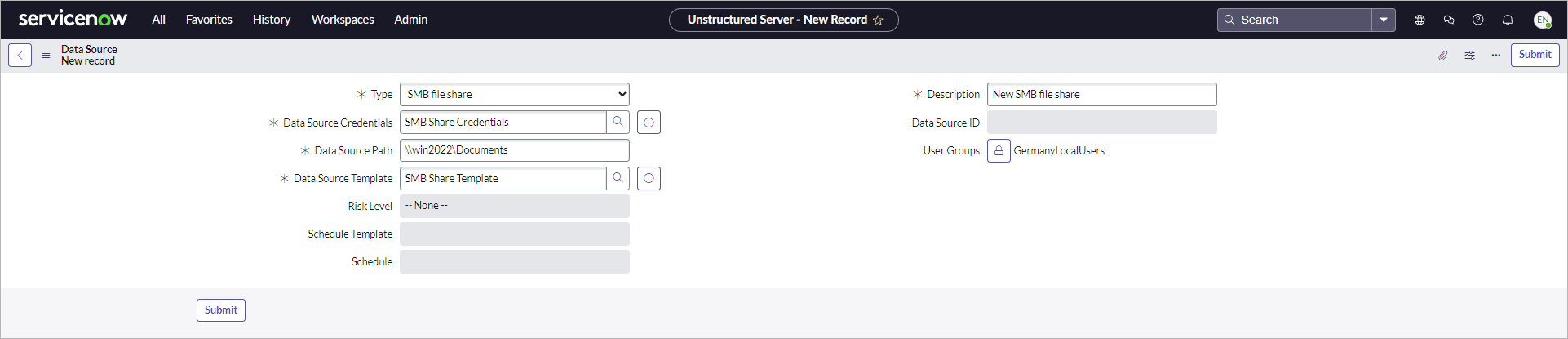
To add an unstructured data source, perform the following steps:
- Click All > Veeam > Unstructured Data > Data Sources.
- Click New.
- In the Type field, select the data source type — a file server or an SMB file share.
- Specify a description for the data source.
- In the Data Source Template field, select a configuration that will be used for this data source. For more information, see Configuring Data Source Templates.
- In the Data Source Path field, specify the FQDN of the file server or the path to the SMB file share in the \\server\folder format.
- In the Data Source Credentials field, select credentials that will be used to connect to this data source. For more information, see Configuring Data Source Credentials.
- To allow a specific user group to use this data source, unlock the User Groups field and select a user group from the list.
- Click Submit.
Note |
|
A data source inherits the risk level from the template. This settings is updated automatically if template changes. |
For more information about unstructured data sources, see the Adding Unstructured Data Source section in the Veeam Backup & Replication User Guide.