This is an archive version of the document. To get the most up-to-date information, see the current version.
Step 1. Launch Import Wizard
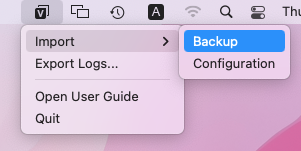
To launch the Import wizard, do either of the following:
- In the Veeam Agent for Mac application menu, select Backup > Import Backup.

Alternatively, you can use the Command-I shortcut on the keyboard.
- In the Veeam Agent for Mac status bar menu, select Import > Backup.