Workflow
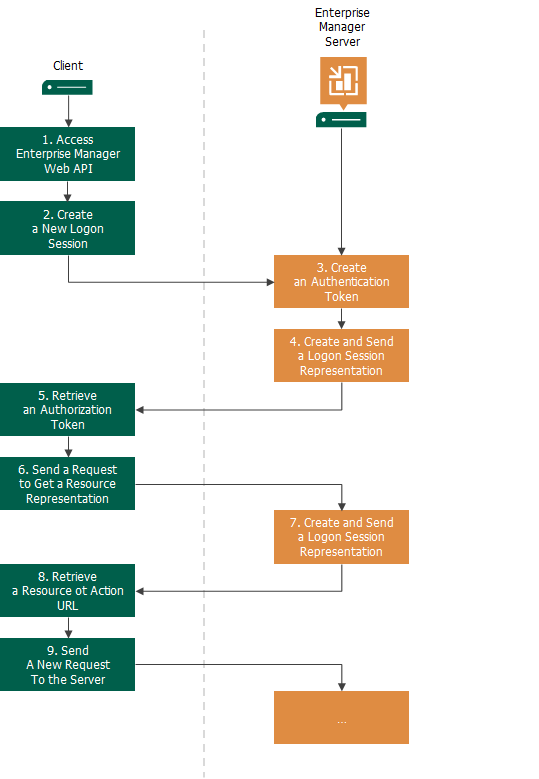
The communication workflow with the Veeam Backup Enterprise Manager REST API typically includes the following steps:
- The client accesses the REST API by its base URL https://<Enterprise-Manager>:9398/api/.
- The client creates a new logon session and sends user credentials to the server to authenticate the user who will work with the REST API.
- The server creates an authentication token for the logon session.
- The server returns a resource representation of the logon session to the client:
- In the response header, the server returns the authorization token — the ID of the created logon session.
- In the response body, the server returns a list of links to resources that the client can access.
- The client extracts the authorization token from the server response.
- The client extracts a URL of the necessary resource from the server response and sends a GET request to retrieve a representation of this resource. In the request header, the client includes the obtained authorization token.
- The server returns a representation of the requested resource.
- The client parses the response and extracts the information it needs. Typically, it is a URL of another resource or an action to perform on the current or related resource.
- Using the retrieved URL and the necessary HTTP method, the client sends the next request, and repeats this process as needed.
|
Important |
|
The authorization token issued by Veeam Backup Enterprise Manager should be passed in the header of every request. For details, see HTTP Authentication. |