
 This is an archive version of the document. To get the most up-to-date information, see the current version.
How Disk Restore Works
In this article
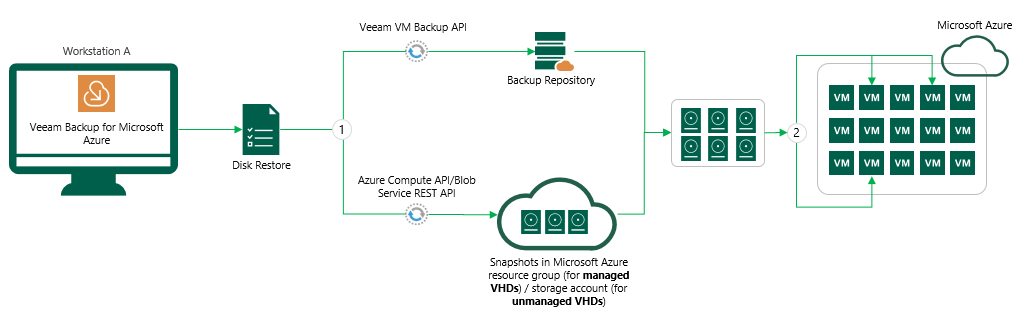
When you run a disk restore, Veeam Backup for Microsoft Azure does the following:
- Retrieves backed-up Azure VHDs from either a backup repository or snapshot. You can select a backup source from which to perform a disk restore at the Restore Point step of the Disk Restore wizard.
To retrieve backed-up VHDs, Veeam Backup for Microsoft Azure uses the following APIs:
- Blob Service REST API — to retrieve managed VHDs from snapshots.
- Azure Compute API — to retrieve unmanaged VHDs from snapshots.
- Veeam VM Backup API — to retrieve managed and unmanaged VHDs from a backup repository.
For more information about managed and unmanaged VHDs in Microsoft Azure, see this Microsoft article.
- Attaches backed-up VHDs to the target Microsoft Azure VM.
Related Topics