This is an archive version of the document. To get the most up-to-date information, see the current version.
Receiving Export Reports
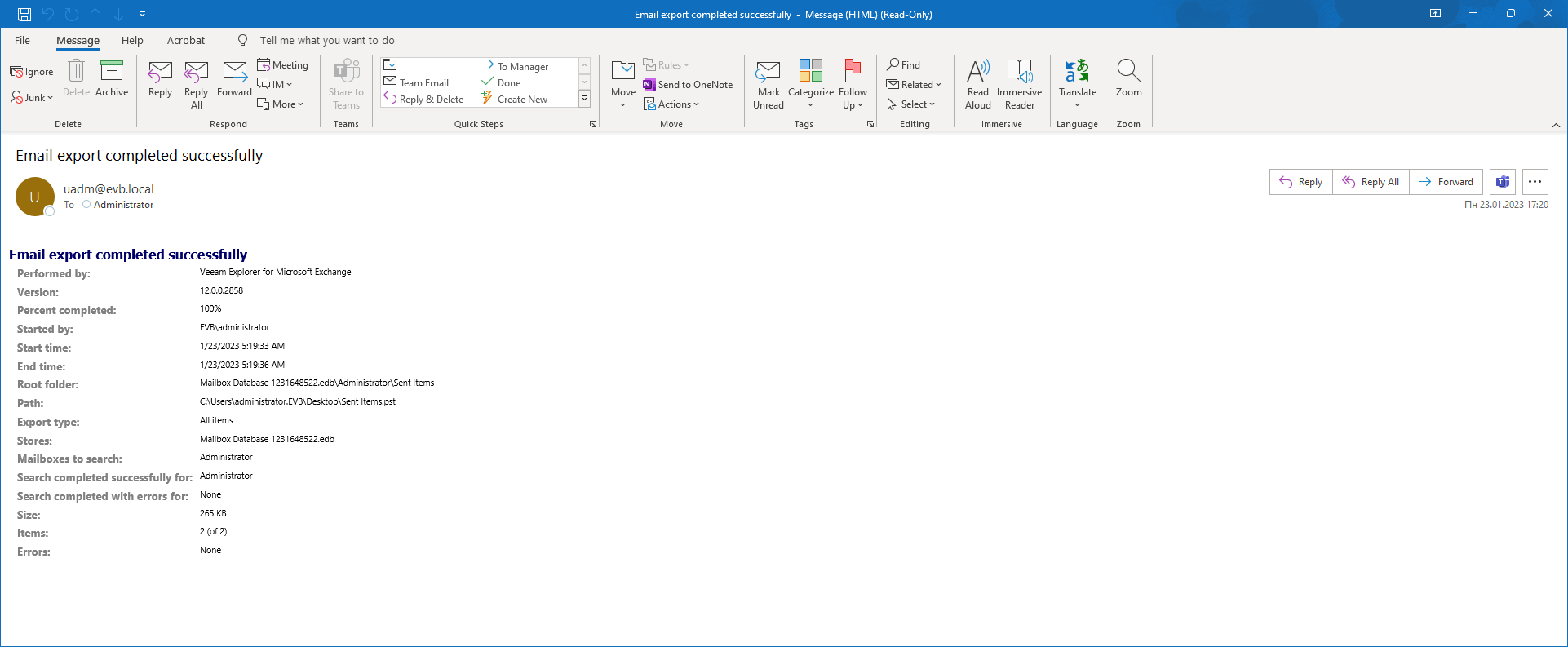
Veeam Explorer for Microsoft Exchange can deliver reports that show summary information about export operations.
Consider the following:
- If you want export reports to be delivered, make sure to configure mail settings in Veeam Explorer for Microsoft Exchange or Veeam Backup & Replication notification settings.
For more information, see the Mail Settings section of this guide and the Configuring Global Email Notification Settings section of the Veeam Backup & Replication User Guide.
- A server with Veeam Explorer for Microsoft Exchange and Veeam Backup & Replication must be in a domain.
- Export reports are delivered automatically upon each export session.
You can use Exporting to Custom Location or Using 1-Click Export.
- Keep in mind the following when specifying recipients of the report:
- The recipient is always the current user account under which Veeam Explorer for Microsoft Exchange is running when using only Veeam Explorer for Microsoft Exchange notification settings.
- The recipient is always the user account provided in Veeam Backup & Replication notification settings when using only Veeam Backup & Replication settings.
- If you have configured both Veeam Explorer for Microsoft Exchange and Veeam Backup & Replication notification settings, the report will be sent to both recipients.
|
Note |
|
If you export Microsoft Exchange data using PowerShell cmdlets and you have a restore session started for Veeam Backup for Microsoft 365, the report will only be sent to the user account provided in Veeam Explorer for Microsoft Exchange notification settings. |
The following table lists fields that are shown in the report.
|
Report field |
Description |
|---|---|
|
Performed by |
Veeam Explorer for Microsoft Exchange |
|
Version |
Shows the Veeam Explorer for Microsoft Exchange build number. |
|
Percent completed |
Shows the number of items included in the PST file. |
|
Started by |
Shows the user account generated the report. |
|
Start time, End time |
Shows the creation time of a report. |
|
Root folder |
Shows the object path. |
|
Path |
Shows the path to the database file. |
|
Export type |
Shows the export type. |
|
Stores |
Shows a datastore name from which items have been exported. |
|
Mailboxes to search |
Shows a mailbox name from which items have been exported. |
|
Search completed successfully for, Search completed with errors for |
Shows results for mailboxes to search. |
|
Size |
Shows the total size of exported items. |
|
Items |
Shows the number of exported items. |
|
Errors |
Shows errors that occurred during export. |