Connecting Microsoft Azure Compute Accounts
If you plan to execute custom scripts inside Microsoft Azure machines managed by a Veeam Backup & Replication server connected to Orchestrator, you must configure a direct connection to the Microsoft Azure compute account (Microsoft Entra ID application) added to this server. To do that:
- Switch to the Administration page.
- Navigate to Infrastructure > Azure.
- Select the compute account and click Configure connection.
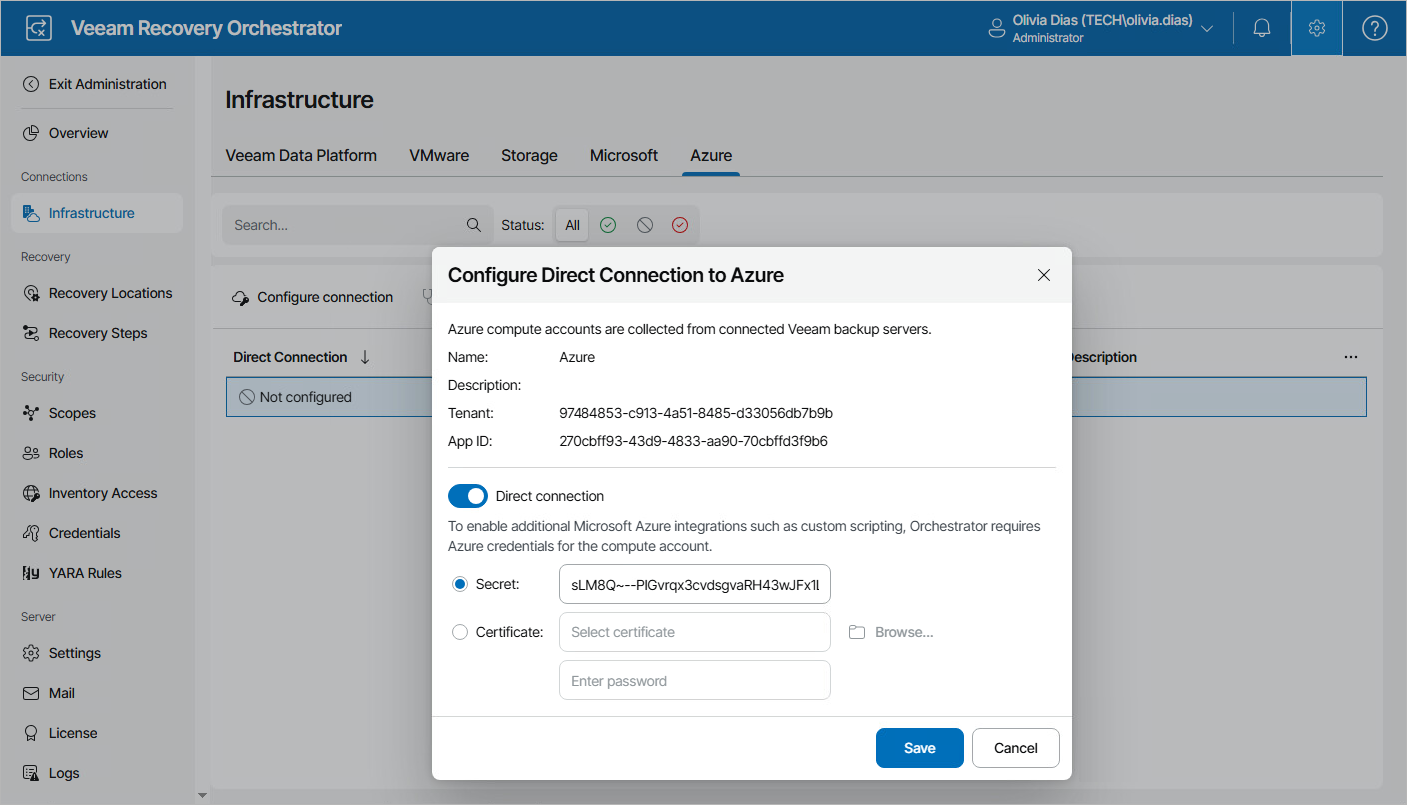
- In the Configure Direct Connection to Azure window, do the following:
- Set the Direct connection toggle to On.
- Use either of the following options:
- If you want to use password-based authentication, select the Secret option and provide the value of a client secret created for the application as described in Microsoft Docs.
Keep in mind that you can copy this value only when creating client secrets.
- If you want to use certificate-based authentication, select the Certificate option, click Browse, locate a certificate obtained from a Certificate Authority (CA), and provide a password for this certificate.
For more information on different types of Microsoft Azure authentication, see Microsoft Docs.
- If you want to use password-based authentication, select the Secret option and provide the value of a client secret created for the application as described in Microsoft Docs.
- Click Save.
Tip |
|
By default, Orchestrator automatically verifies connections to Microsoft Azure compute accounts once a day to ensure that the provided certificates and client secret values are valid. To do that manually, select the necessary connection and click Check connection. |