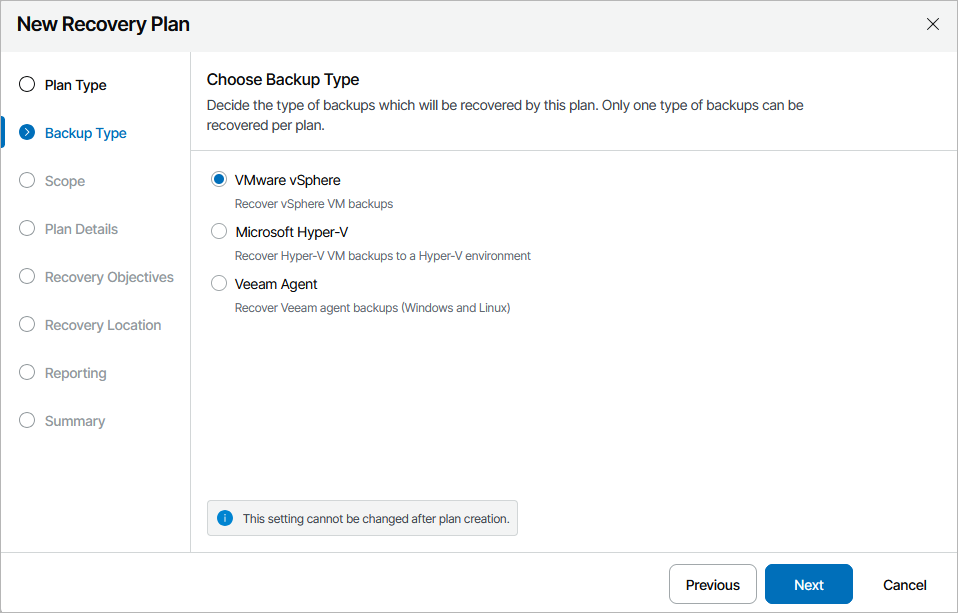
Step 3. Choose Backup Type

At the Backup Type step of the wizard, choose whether you want to recover machines from vSphere VM backups, Veeam Agent backups or Hyper-V backups. Starting from version 13.1, the Microsoft Hyper-V option also allows you to recover machines from Azure Local backups.

Note that one restore plan can contain inventory groups of one type only (either VMWare vSphere, Veeam Agent or Microsoft Hyper-V). To recover workloads added to inventory groups of different types, create separate restore plans.

Important

For Orchestrator to be able to recover a machine to a VMware vSphere environment, the machine must have VMware Tools installed:

  • For VMs recovered from Veeam agent backups, Orchestrator automatically verifies whether VMware Tools are installed on all machines included in a plan when running a readiness check or a DataLab test for the plan. However, this verification is supported for Windows-based machines only. For Linux-based machines, you must perform the verification manually.
  • For VMs recovered from vSphere backups, the verification is performed automatically on the vCenter Server side — for both Windows-based and Linux-based VMs. To know how to install and upgrade VMware Tools in vSphere, see this VMware KB article.

Creating Restore Plan

Page updated 2026-08-31

Page content applies to build 13.1.0.483