 This is an archive version of the document. To get the most up-to-date information, see the current version.
Storage Settings
To specify compression settings for the backup job:
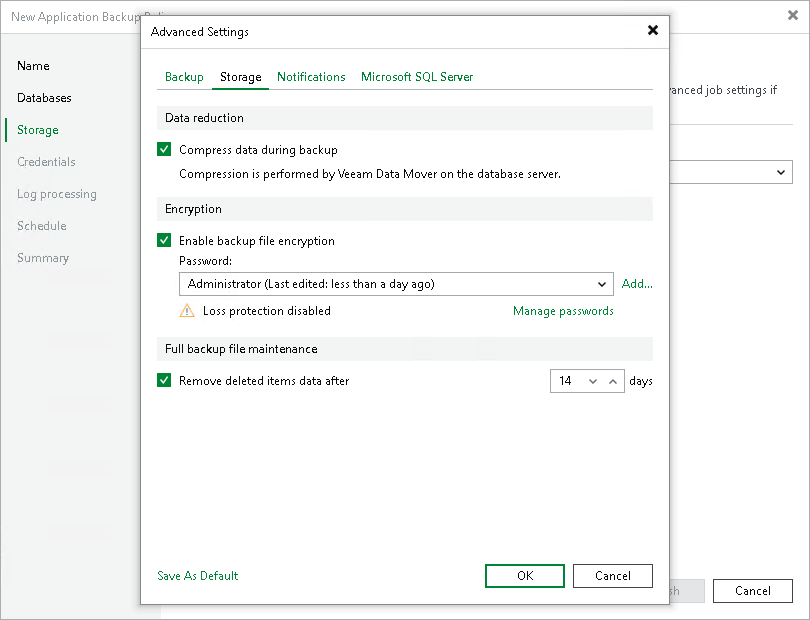
- At the Storage step of the wizard, click Advanced.
- Click the Storage tab.
- Select the Compress data during backup check box to enable Veeam Data Mover compression on the database server.
- To encrypt the content of backup files, select the Enable backup file encryption check box. In the Password field, select a password that you want to use for encryption. If you have not created the password beforehand, click Add or use the Manage passwords link to specify a new password. For more information, see Password Manager.
If the backup server is not connected to Veeam Backup Enterprise Manager, you will not be able to restore data from encrypted backups in case you lose the password. Veeam Backup & Replication will display a warning about it. For more information, see Decrypting Data Without Password.
You can select a Key Management System (KMS) server in the Password field. To do this, the KMS server must be added to Veeam Backup & Replication in advance. If you choose to use KMS keys for backup file encryption at this step of the wizard, Veeam Backup & Replication immediately starts communication with the KMS server to retrieve the encryption keys. To learn more, see Key Management System Keys.
NOTE |
|
Consider the following:
|
- To automatically delete outdated database backups, select the Remove deleted items data after check box and specify the time period in days. The default time period is 14 days.
If you select the Remove deleted items data after check box, Veeam Backup & Replication performs the force delete operation after each backup policy run. If all backups of a database (full, differential and log) are older than the specified time period, Veeam Backup & Replication deletes all backups of this database from the backup files (.VAB). For more information on the logic behind the force delete operation, see Force Delete Operation.
Important |
Use the force delete operation with caution, as it may lead to data loss. For example, the force delete operation can remove backups earlier than it is intended according to the retention policy. |
If you plan to encrypt the content of backup files, consider the following limitations:
- Data encryption settings for application backup policies configured in Veeam Backup & Replication are stored to the Veeam Backup & Replication database.
- If you enable or disable encryption for an existing application backup policy, Veeam Backup & Replication will apply the updated setting during the next job session. Veeam Backup & Replication will also command Veeam Plug-In to store the next created backup into a new backup file.
- Encryption is not retroactive. If you enable encryption for an existing backup policy, Veeam Backup & Replication will encrypt the backup chain starting from the next restore point created with this policy.
To learn more about data encryption in Veeam Backup & Replication, see Data Encryption.