Removing Companies

Veeam Backup for Salesforce allows you to permanently remove a company from the configuration database if you no longer need it. When you remove a company, Veeam Backup for Salesforce verifies whether you have associated any Salesforce organizations with this company, and if yes, suggests you to associate these organizations with another company.

Important

When you remove a company and associate organizations with another company:

  • If a user has company-wide permissions in the new company, they will automatically be granted access to the data of all new Salesforce organizations associated with this company.
  • If a user has permissions to access data of the removed company or any of the Salesforce organizations associated with this company, they will not be automatically assigned permissions to access data of the new company.
  • If a user has the same roles in both the removed and the new companies with permissions to access specific organizations within the company, they will retain those roles with the same permissions in these organizations.

Consider the following example: User_1 has the Restore operator role for organization_1 that belongs to company_1 and the Restore operator role for organization_2 that belongs to company_2. You remove company_1 and associate organization_1 with company_2. In this case, user_1 will retain his permissions of the Restore operator role to organization_1 and organization_2 in company_2.

To remove a company, do the following:

  1. Switch to the Configuration page.
  2. Navigate to Companies
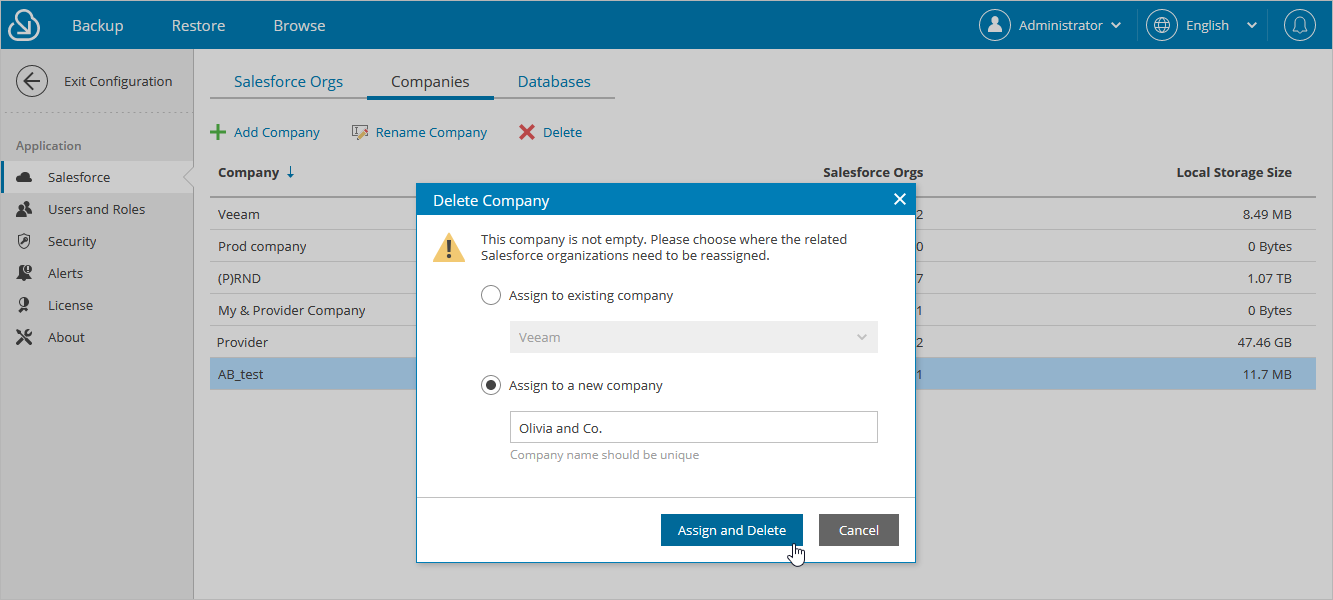
  3. Select the necessary company and click Delete.
  4. [Applies only if any Salesforce organizations are associated with the selected company] In the Delete Company window, associate organizations that belong to the selected company with another existing company. To do that, choose a company from the drop-down list and click Assign and Delete.

For a company to be displayed in the list of available companies, it must be created as described in section Adding Companies.
Removing Companies

Page updated 3/30/2026

Page content applies to build 3.2.0.3957