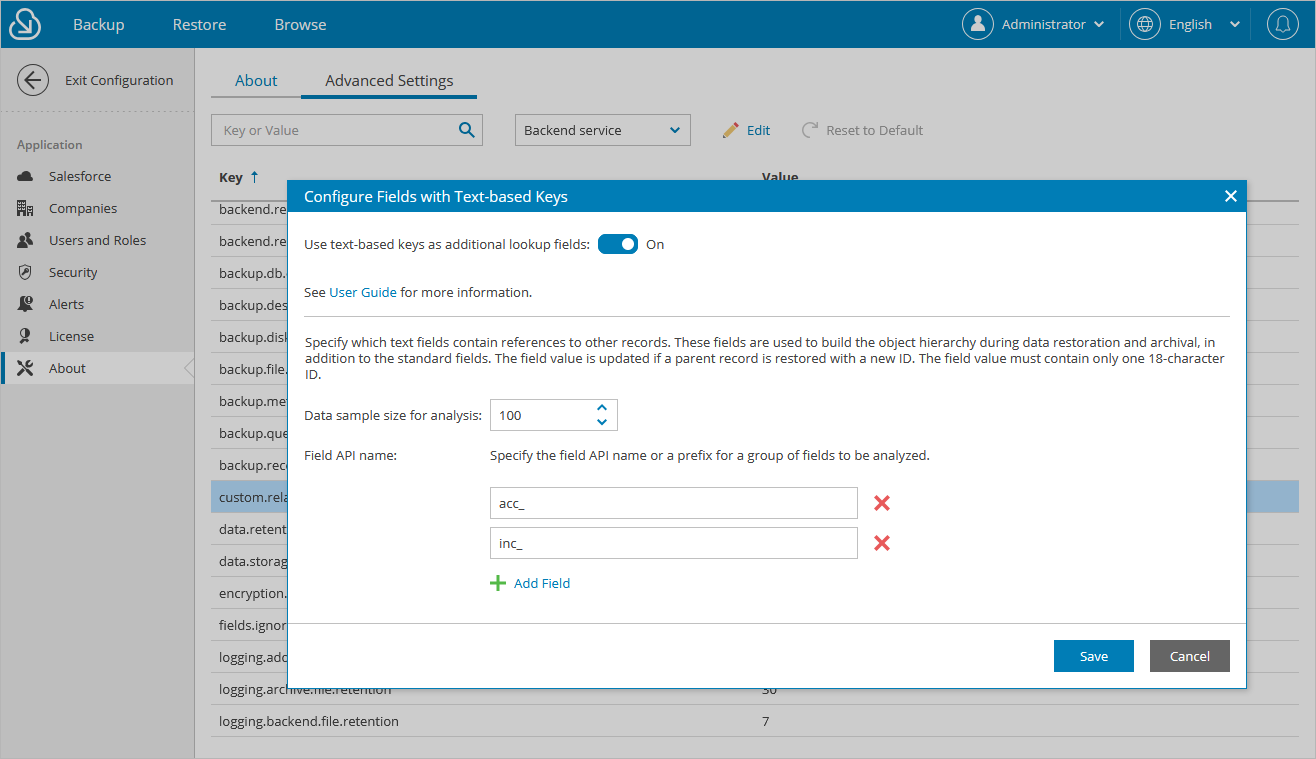
Configuring Text-Based Key Fields
If you have object records in Salesforce that include text fields containing IDs of other records, you can instruct Veeam Backup for Salesforce to treat these text fields as lookups. This means that the records containing the text fields will be treated as child records linked using restricted relationships. You can further restore and archive the hierarchy of these records.
To identify text fields that may potentially be used as lookups when restoring or archiving data of a Salesforce organization, perform the following steps:
- Install the postgresql-contrib package on the PostgreSQL server that is used to host databases of the protected organization.
- In the Veeam Backup for Salesforce Web UI, do the following:
- Switch to the Configuration page.
- Navigate to About > Advanced Settings and click Confirm.
- In the list of available settings, locate
custom.relationshipsand click Edit. - In the Text-based Key Settings window, specify the API names or prefixes of fields that you want to be analyzed, and click Save.
When analyzing the fields, Veeam Backup for Salesforce will detect all objects that contain fields with the specified API names and prefixes — and then will look through the first 100 records of each of the detected objects to identify non-empty field values. To modify the number of records, provide a new value in the Sample size for analysis field.
Important
For text fields to be processed as lookups, all fields with the same API name or prefix must belong to the same object, and the text field values must be record IDs consisting of 18 characters.
After you click Save, Veeam Backup for Salesforce will not start looking through text fields and updating the backup database immediately. The product will wait till the next day (or till the related restore job or archival policy is launched) — and then will keep analyzing the fields once a day until you disable this functionality. To track the results, proceed to the Audit page.
Tip |
|