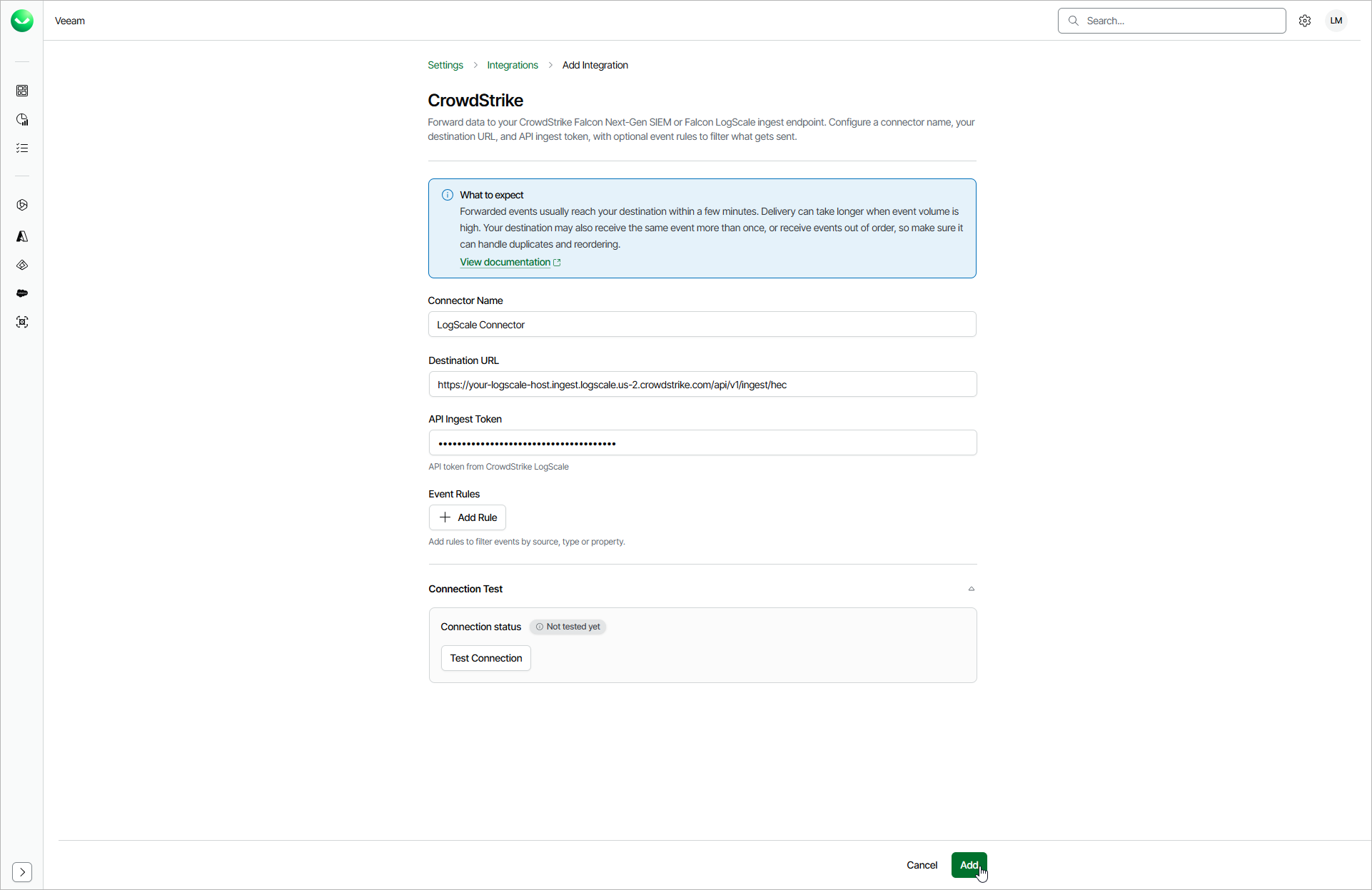
Adding CrowdStrike Integrations
A CrowdStrike integration forwards events from Veeam Data Cloud to CrowdStrike LogScale using an API ingest token. The forwarded events can then be used for threat detection, correlation rules and dashboards in CrowdStrike LogScale.
Before you add a CrowdStrike integration, create a repository in CrowdStrike LogScale and generate an ingest token for it. You need the ingest endpoint URL and the token value to complete the procedure. For details on ingest tokens, see LogScale Documentation. For HEC ingest example, see LogScale Documentation.
To add a CrowdStrike integration, do the following:
- Click the settings icon in the top-right corner.
- Select Integrations.
- On the Integrations tab, click Add Integration.
- In the Select Integration window, select CrowdStrike and click Continue.
- In the Connector Name field, specify a name for the integration.
- In the Destination URL field, specify the LogScale ingest endpoint URL, for example, https://your-logscale-host.ingest.logscale.us-2.crowdstrike.com/api/v1/ingest/hec.
- In the API Ingest Token field, enter the API ingest token from CrowdStrike LogScale. The token is stored securely and masked when you view the integration later.
- [Optional] In the Event Rules section, click Add Rules to define which event types and properties to forward and how to format them. If you do not add any rules, Veeam Data Cloud forwards raw events. For details on configuring event rules, see Configuring Event Rules.
- To verify your settings, click Test Connection. Veeam Data Cloud will send a test event to the specified destination.
- Click Add to save the integration.
If Veeam Data Cloud determines that credentials are present in the URL or a custom header, it will ask for your confirmation and prompt you to move them to the authentication section, where they will be stored securely.