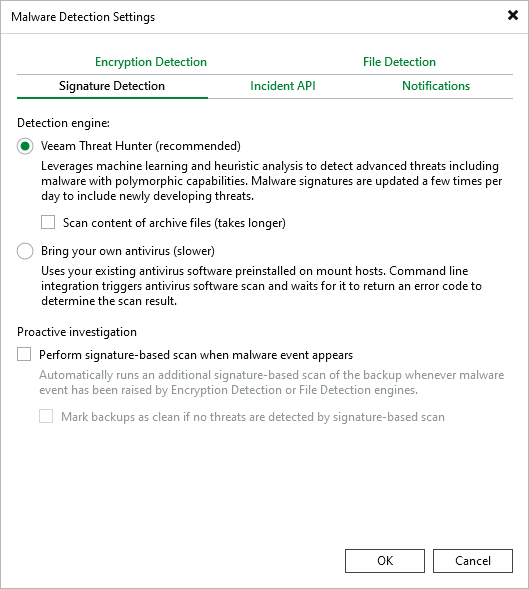
Signature Detection
You can configure default engines to scan restore points. To do this, do the following:
- From the main menu, select Malware Detection > Signature Detection.
- Specify a detection engine:
- If you want to use Veeam Threat Hunter, select Veeam Threat Hunter. To include additional archive and compound files, such as RAR, ZIP, CHM, installers, and so on in the scan list, select the Scan content of archive files check box. Note that this option may increase scan time. For more information about Veeam Threat Hunter, see Veeam Threat Hunter for Scan Backup and Veeam Threat Hunter for Secure Restore.
- If you want to use 3rd party antivirus software, select Bring your own antivirus. For more information about antivirus scan, see Antivirus Scan for Scan Backup and Antivirus Scan for Secure Restore.
- To additionally scan restore points marked as Suspicious after file system activity analysis or the inline scan, select the Perform signature-based scan when malware event appears check box. In this case, a Scan Backup session will run automatically:
- If malware activity is detected, the Veeam Data Analyzer Service will create a new malware detection event and mark the restore point and the workload as Infected.
- If malware activity is not detected, the Veeam Data Analyzer Service will create a new malware detection event with the Informative status. After that, you can mark a restore point and a workload as Clean. For more information, see Managing Malware Status.
- If a restore point contains encrypted disks, such disks cannot be mounted and will not be scanned. In this case, a scan session will display mount errors in the log file and will be finished with Warning. The Veeam Data Analyzer Service will not create any malware detection events.
For more information on how to exclude machines with encrypted disks from the signature-based scan scope, see this KB article.
To automatically mark a restore point and a workload as Clean, select the Mark backup as clean if no threats are detected by signature-based scan check box. In this case, a malware detection event with the Informative status will not be created and a Clean event will be created instead.
|
Note |
|
Consider the following when you use a proactive signature-based scan:
|