Step 4. Configure Backup Destination Settings
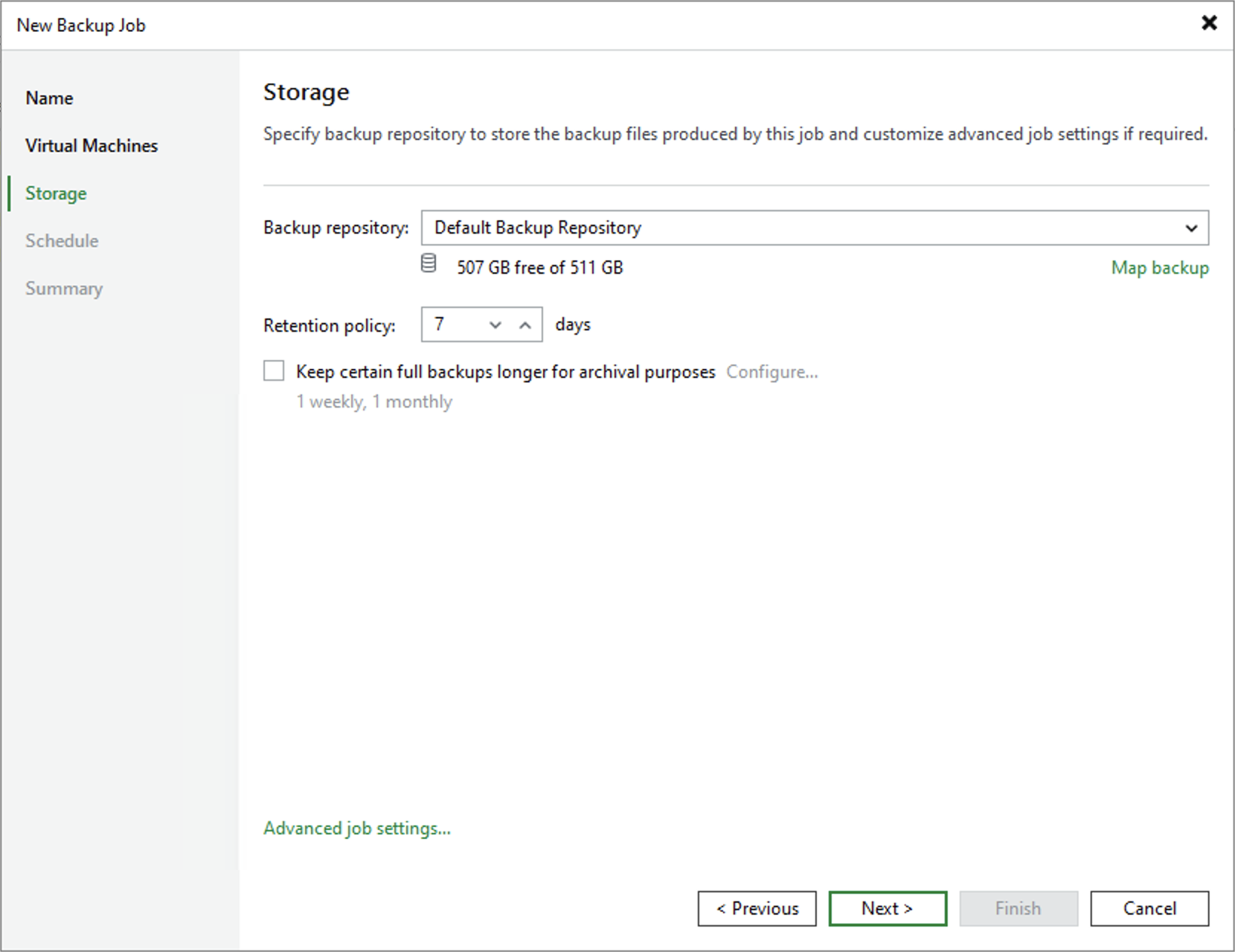
At the Storage step of the wizard, do the following:
- In the Backup repository drop-down list, select a backup repository where you want to store backups. For a backup repository to be displayed in the list of available repositories, it must be added to the backup infrastructure.
You can map the job to a specific backup stored in the backup repository. Backup job mapping can be helpful if you have moved backup files to a new backup repository and want to point the job to existing backups in this new backup repository. You can also use backup job mapping if the configuration database gets corrupted and you need to reconfigure backup jobs. To map the job to a backup, click the Map backup and choose the necessary backup.
- In the Retention policy section, choose how long Veeam Backup & Replication will keep restore points in a backup chain. If a restore point is older than the specified limit, Veeam Backup & Replication will remove it from the chain.
|
Note |
|
If the UUID of a VM changes (for example, if the VM was removed and then a new VM with the same name was created), Veeam Backup & Replication will be unable to continue the backup chain for this VM. After you re-add the VM to the backup job, Veeam Backup & Replication will start a new backup chain for it. However, you will still be able to perform restore operations using backups from the old backup chain. |
To help you implement a comprehensive backup strategy, Veeam Backup & Replication allows you to enable long-term retention policy for backups and to configure advanced job settings (such as notification settings, health check, active and synthetic full backups).