Step 1. Launch New Agent Backup Job Wizard
You can create a Veeam Agent backup job managed by the backup server for protected computers that run a Linux OS in the Veeam Backup & Replication web UI in one of the following ways:
- Create a new backup job — in this case, Veeam Backup & Replication will launch the New Agent Backup Job wizard. You will be able to specify protection groups and Veeam Agent computers to which the backup job settings must apply at the Computers step of the wizard.
- Add a protection group to a new backup job — in this case, Veeam Backup & Replication will launch the New Agent Backup Job wizard and add the selected protection group to the backup job. You will also be able to change the list of Veeam Agent computers to which the backup job settings must apply at the Computers step of the wizard.
- Add individual computers to a new backup job — in this case, Veeam Backup & Replication will launch the New Agent Backup Job wizard and add the selected computers to the backup job. You will also be able to change the list of Veeam Agent computers to which the backup job settings must apply at the Computers step of the wizard.
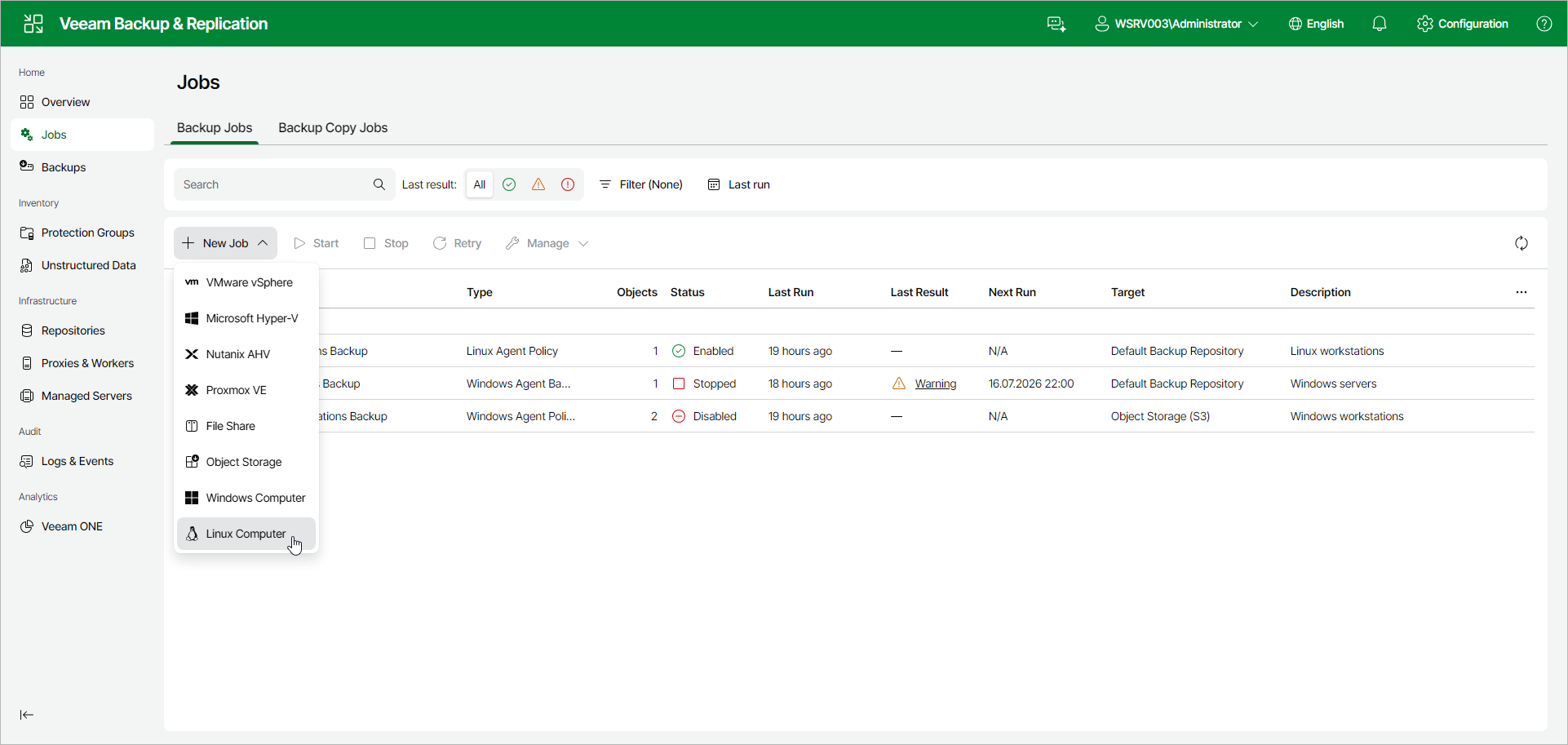
To launch the New Agent Backup Job wizard:
- In the management pane, click Jobs.
- On the toolbar, click New Job > Linux Computer.
Adding Protection Group to New Backup Job
To add a protection group to a new Veeam Agent backup job:
- In the management pane, click Protection Groups.
- Select the check box next to the protection group that you want to add to the backup job.
- On the toolbar, click Add to backup job > Linux > New job. Alternatively, right-click the protection group and select Add to backup job > Linux > New job.
Veeam Backup & Replication will start the New Agent Backup Job wizard and add the protection group to the job. You can add other protection groups and individual computers to the job later on, when you pass through the wizard steps.
Adding Computers to New Backup Job
To add specific computers to a new Veeam Agent backup job:
- In the management pane, click Protection Groups.
- Select the protection group that contains the necessary computers.
- In the working area, select the check boxes next to one or more computers that you want to add to the job.
- On the toolbar, click Add to backup job > New job. Alternatively, right-click the selected computer and select Add to backup job > New job.
Veeam Backup & Replication will start the New Agent Backup Job wizard and add the selected computers to the job. You can add other computers and protection groups to the job later on, when you pass through the wizard steps.
|
TIP |
|
You can add an individual computer or protection group to a Veeam Agent backup job that is already configured in Veeam Backup & Replication. To learn more, see Adding Computers to Backup Job and Adding Protection Group to Backup Job. |