Backup Job and Snapshot Script Settings
Before you configure script execution settings, review the considerations and limitations in the Backup Job and Snapshot Scripts section.
You can specify custom scripts that will be executed within the backup policy session on Linux computers. Veeam Agent for Linux supports the following types of scripts:
- Backup job scripts — pre-job and post-job scripts that run on the Veeam Agent computer before and after the backup policy session.
- Snapshot scripts — pre-freeze and post-thaw scripts that run on the Veeam Agent computer before and after the volume snapshot is created.
IMPORTANT |
Snapshot script settings are not available if you select the Backup directly from live file system option at the Backup Mode step of the wizard. If this option is selected, data will be backed up without a snapshot. |
Note |
|
If you use Veeam Backup & Replication on Linux, you must place the scripts into the /var/lib/veeam/scripts* directory on the backup server. If you use Veeam Backup & Replication on Windows, you can place the script files in any local folder on the backup server. |
Specifying Backup Job and Snapshot Scripts
To specify custom scripts for the policy:
- At the Guest Processing step, select the Enable application-aware processing check box.
- Click Applications.
- In the displayed list, select a protection group or individual computer and click Edit.
To define custom settings for a computer added as a part of a protection group, you must include the computer to the list as a standalone object. To do this, click Add and choose the computer whose settings you want to customize. Then select the computer in the list and define the necessary settings.
- [For an entire computer backup or volume-level backup policy] In the Processing Settings window, click the Scripts tab.
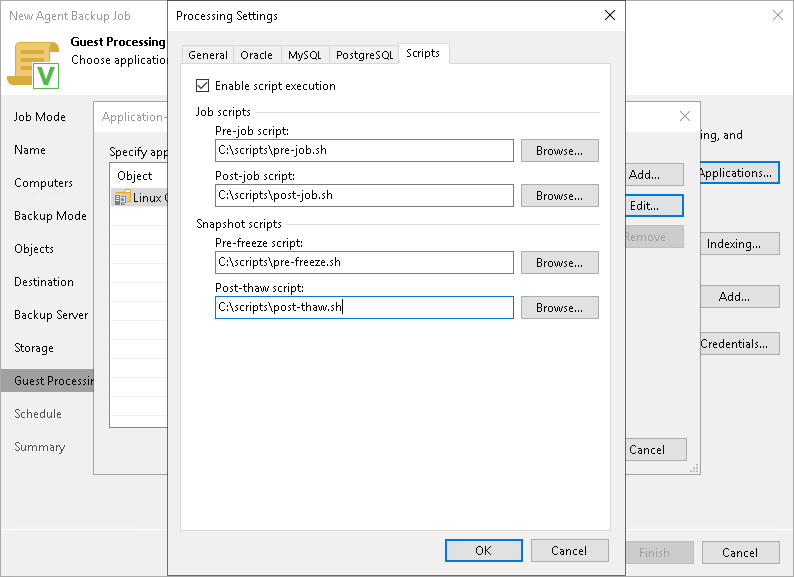
- Select the Enable script execution check box.
- In the Job scripts section, specify custom scripts that you want to execute before and after the backup policy session. To do this, in the Pre-job script and Post-job script fields, click Browse and choose executable files from a local folder on the backup server.
- In the Snapshot scripts section, specify custom scripts that you want to execute before Veeam Agent for Linux creates a snapshot of the backed-up volume and after the snapshot is created. To do this, in the Pre-freeze script and Post-thaw script fields, click Browse and choose executable files from a local folder on the backup server.
When the backup policy is applied, Veeam Backup & Replication uploads the scripts to the /var/lib/veeam/scripts/<backup policy ID>/<script type>/ directory on each Veeam Agent computer included in the backup job. Veeam Agent executes the scripts from the same directory under the root user.