Protection Group Types
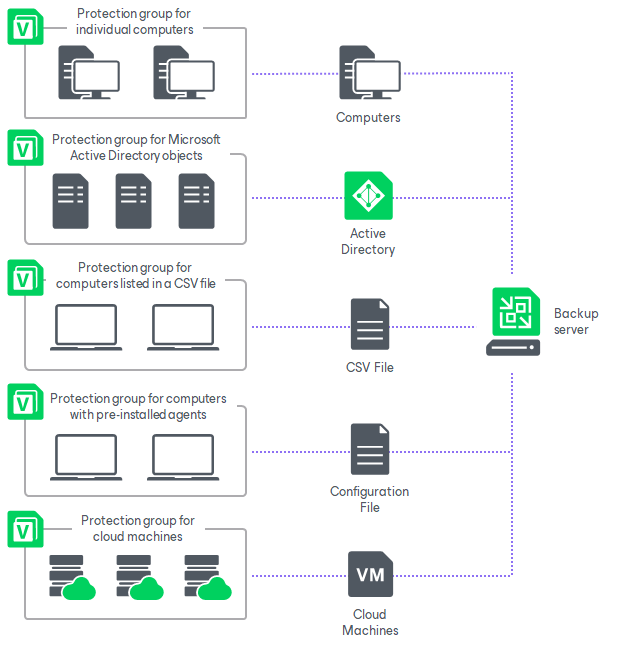
Veeam Backup & Replication lets you organize computers protected by Veeam Agent into protection groups. The protection group type determines how Veeam Backup & Replication discovers computers, deploys or connects to Veeam Agent, and keeps protection group membership up to date.
Before you select a protection group type, make sure that it supports the operating system running on the computers you plan to protect. For details, see Protection Group Support by Operating System.
You can create protection groups of the following types:
You can create a protection group by adding individual computers directly in the protection group settings.
This option is recommended for smaller environments where Microsoft Active Directory is not deployed.
Veeam Backup & Replication connects to computers included in this protection group by using credentials or certificate-based authentication.
To learn how to create a protection group for individual computers, see Creating Protection Group for Individual Computers.
You can create a protection group based on Microsoft Active Directory objects, such as an entire domain, container, organizational unit, group, computer or failover cluster.
This option lets you manage Veeam Agents on computers that are members of an Active Directory domain.
Protection groups based on Active Directory domains, containers, groups or organizational units are dynamic. For example, when a new computer is added to a container included in the protection group scope, Veeam Backup & Replication automatically discovers the computer and manages it according to the protection group settings. Veeam Backup & Replication connects to computers included in this protection group by using credentials or certificate-based authentication. You can define the protection scope based on Active Directory objects in one of the following ways:
- Add specific Active Directory objects to the protection group scope, such as selected organizational units or computers.
- Add a parent Active Directory object, such as an entire domain, container or organizational unit, and exclude specific child objects from the scope.
To learn how to create a protection group for Microsoft Active Directory objects, see Creating Protection Group for Microsoft Active Directory Objects.
|
NOTE |
|
You can add a failover cluster only to a protection group that includes Microsoft Active Directory objects. |
You can create a protection group by importing a list of computers from a CSV or TXT file.
This option is useful when you maintain a list of computers to protect in a CSV or TXT file.
Protection groups based on a CSV or TXT file are dynamic. If you add a new computer to the file after the protection group is created, Veeam Backup & Replication updates the protection group membership during the next rescan and includes the added computer in the protection group scope.
To learn how to create a protection group for computers from a CSV file, see Creating Protection Group for Computers from CSV File.
You can create a protection group for computers on which Veeam Agent is already installed or will be installed manually. When created, such protection groups are empty. To add computers to the protection group, deploy Veeam Agent on the required computers and configure the agents to connect to the Veeam backup server. After the agents connect to the backup server, the computers become members of the protection group.
This option is recommended if you do not have the complete list of computers that you want to protect when you create the protection group. You can also use this option when you want to install agents with third-party software distribution tools, or when deployment from the Veeam backup server is restricted by security policies or network connectivity limitations.
This is the only option for Veeam Agent for Mac and nosnap Veeam Agent for Linux on Power.
To learn how to create a protection group for computers with pre-installed backup agents, see Creating Protection Group for Computers with Pre-Installed Backup Agents.
You can create a protection group to manage Veeam Agents installed on Amazon EC2 instances and Microsoft Azure virtual machines, also referred to as cloud machines.
This option is useful if you have cloud machines that run VSS-aware applications and you want to create transactionally consistent backups of these applications.
This protection group type lets Veeam Backup & Replication discover cloud machines and deploy Veeam Agent by using cloud-native APIs instead of connecting to the machines over the network. Cloud machines running Microsoft Windows or Linux are supported.
To learn how to create a protection group for cloud machines, see Creating Protection Group for Cloud Machines.
IMPORTANT |
This guide does not describe protection groups for applications. For information about this protection group type, see MongoDB Backup. |