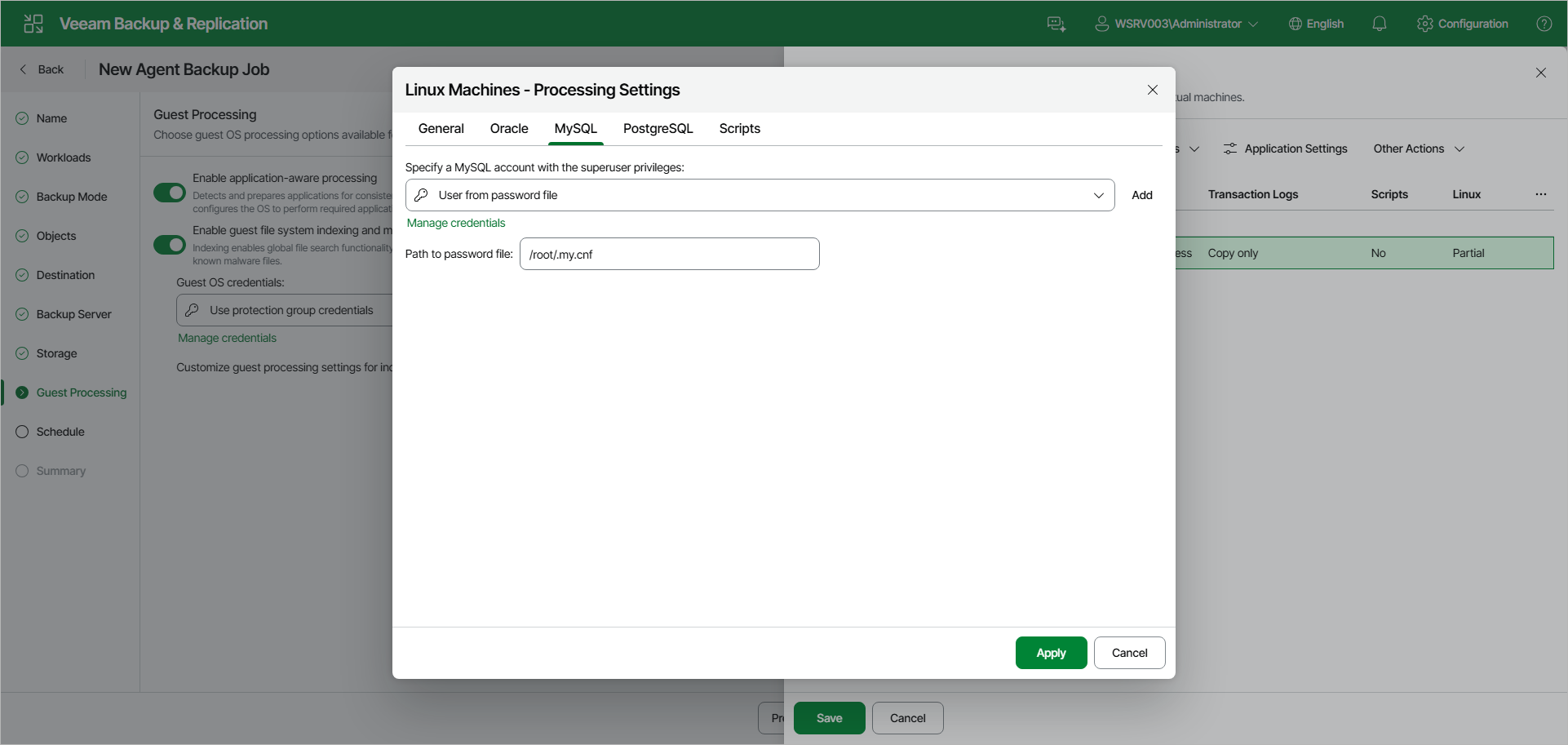
MySQL Processing Settings
You can specify how Veeam Agent for Linux must process a MySQL database.
Before You Begin
MySQL tables with the MyISAM storage engine must be locked to keep them in a consistent state while Veeam Agent is creating the system snapshot. To correctly process such tables, make sure that the user account you want to specify in the MySQL processing settings has the following instance-wide privileges:
- SELECT. This privilege enables Veeam Agent to access tables' metadata and select for a lock the tables that use the MyISAM storage engine. Without this privilege, the processing of the MySQL database system will run successfully but MyISAM tables will not be locked, which may result in an inconsistent state of the backed up data.
- LOCK TABLES. This privilege is required for locking the selected MyISAM tables. If some MyISAM tables are selected but the MySQL account does not have the LOCK TABLES privilege, the processing of the MySQL database system will fail.
- RELOAD or FLUSH_TABLES. If some MyISAM tables are selected but the MySQL account does not have either RELOAD or FLUSH_TABLES privilege, the processing of the MySQL database system will fail.
To obtain information about the privileges that are assigned to an account, use MySQL functionality, for example, the SHOW GRANTS statement. To learn more, see MySQL documentation.
Configuring MySQL Processing
To specify how Veeam Agent for Linux must process a MySQL database system:
- At the Guest Processing step of the wizard, make sure that the Enable application-aware processing toggle is on.
- Click Customize.
- In the Customize Guest Processing Settings window, select the check box next to the protection group or individual computer and click Application Settings on the toolbar.
- In the Processing Settings window, on the General tab, make sure that Require successful processing or Try application processing, but ignore failures is selected in the Applications section.
- Open the MySQL tab.
- From the Specify a MySQL account with the superuser privileges drop-down list, select a user account that Veeam Agent for Linux will use to connect to the MySQL database.
If you have not set up credentials beforehand, click the Manage credentials link or click Add on the right to add credentials.
By default, the User from password file option is selected. With this option selected, Veeam Agent for Linux will connect to the MySQL database under the account specified in the password file on the Veeam Agent computer. The default location for the password file is /root/.my.cnf. For information about the password file format, see the Preparing Password File for MySQL Processing section in the Veeam Agent for Linux User Guide.
- If you want to specify a custom path to the password file, specify a full path in the Path to password file field. Specifying relative paths is not supported.
For information on how Veeam Agent for Linux processes the MySQL database system, see the MySQL Backup section in the Veeam Agent for Linux User Guide.