Configuring Node Exporter
Node Exporter shares performance metrics from the Veeam Software Appliance and Veeam Infrastructure Appliances in the Prometheus format.
You can configure Node Exporter in the Veeam Backup & Replication web UI. Veeam Backup & Replication then distributes the settings to all Veeam Appliances in your backup infrastructure.
Node Exporter shares the following metrics:
- Default Node Exporter metrics, such as CPU, RAM, disk, and network consumption
- cpu_vulnerabilities, ethtool, and mountstats
- XFS quota information
- iSCSI and Fibre Channel information
- Status of Veeam services
Enabling Metrics Sharing
To configure Node Exporter, do the following:
- Click Configuration in the top bar.
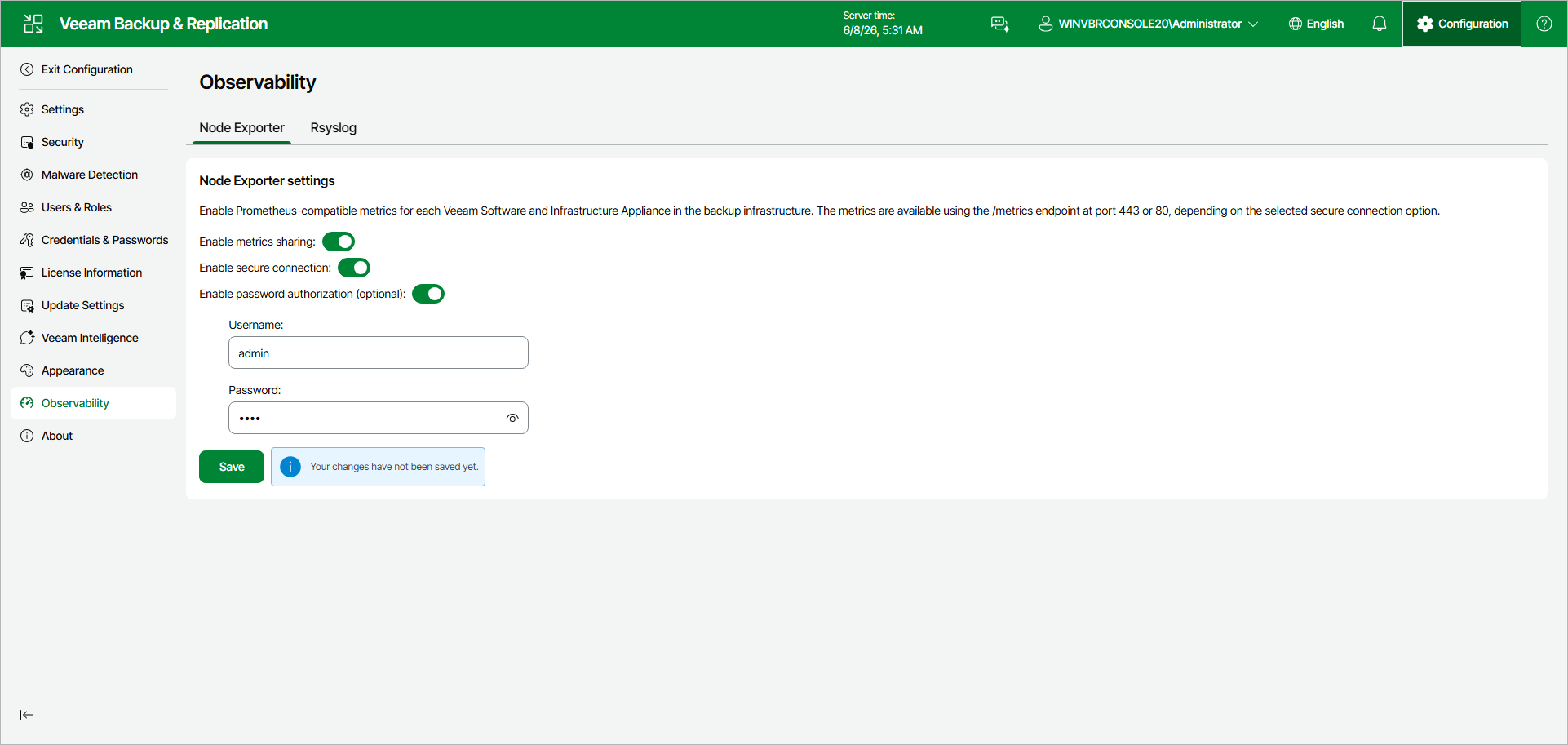
- In the management pane, click Observability > Node Exporter.
- Set the Enable metrics sharing toggle to On.
- Set the Enable secure connection toggle to On to share metrics over HTTPS (port 443). If you leave it Off, metrics are shared over HTTP (port 80).
- [Optional] Set the Enable password authorization toggle to On. Then, specify a user name and password to access the metrics data.
Once configured, a monitoring server can retrieve the metrics from https://%YourApplianceIP%/metrics or http://%YourApplianceIP%/metrics.