Step 7. Configure Network Settings
At the Network step of the wizard, select to which networks and subnets the restored workloads will be connected. By default, Veeam Backup & Replication creates a new security group for the restored workloads. The default security group rules are listed in Default Security Group Rules.
Configuring Network
To define network settings for a workload, do the following:
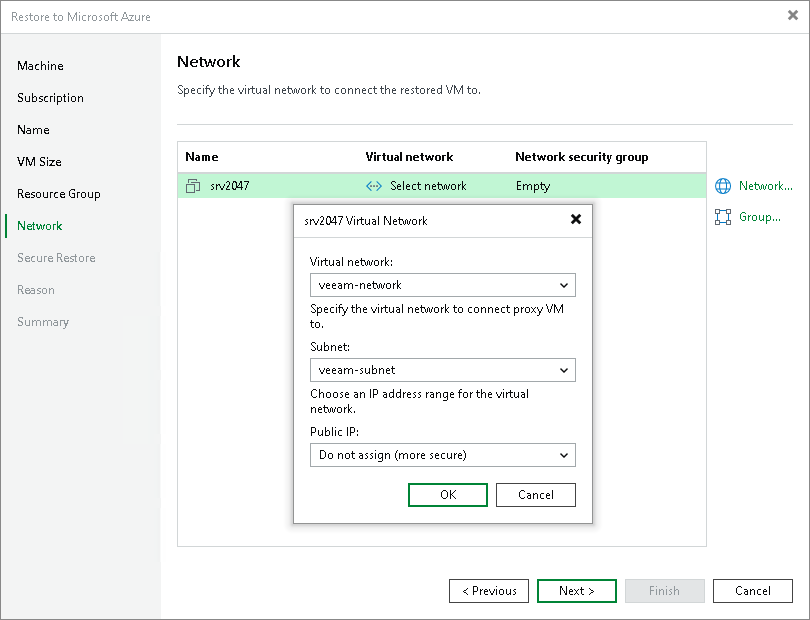
- In the Virtual network list, select a workload and click Network.
- From the Virtual network drop-down list, select a network to which the workload must be connected.
- From the Subnet drop-down list, select a subnet for the workload.
- In the Public IP field, specify whether to assign a public IP to the workload. You have two options:
- Assign (restored VM will be accessible from the Internet). The public IP will be assigned to the restored workload. For security reasons, make sure traffic filtration rules are properly configured in the security group.
- Do not assign (more secure). The public IP will not be assigned. You can assign a public IP later in the settings of the restored workload.
Note |
Veeam Backup & Replication can connect a workload only to one virtual network. If necessary, you can manually configure additional network connections in Microsoft Azure after the workload is restored. |
Configuring Security Group
To change a security group to which a workload will be restored:
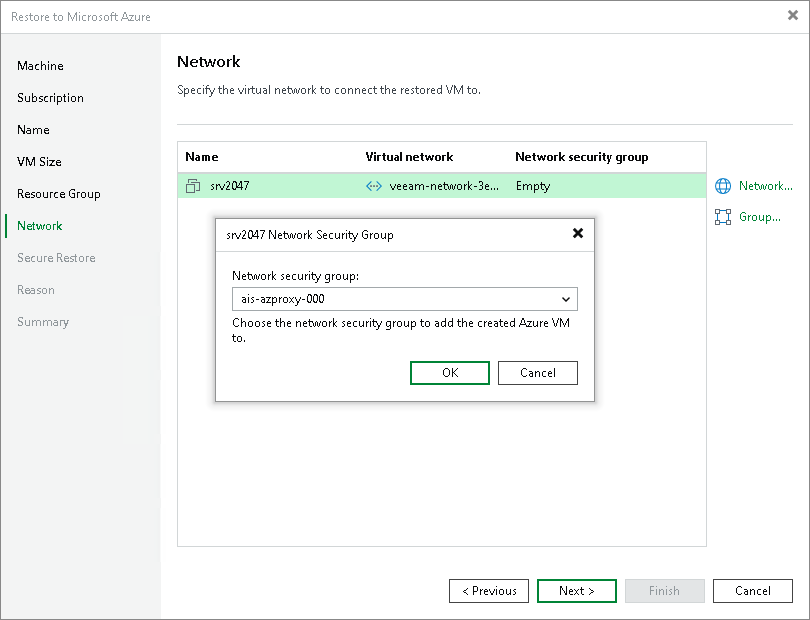
- From the Virtual network list, select a workload and click Group.
-
From the Network security group drop-down list, how Veeam Backup & Replication assigns a network security group:
Create new. Veeam Backup & Replication creates a new network security group. The rules for this group are described in Default Security Group Rules.
- Do not assign (use subnet settings). Veeam Backup & Replication uses the network security group already associated with the target subnet.
- <existing group>. Veeam Backup & Replication assigns the selected network security group.
When you select the Create new option while configuring the security group, Veeam Backup & Replication creates a security group with the following rules.
Priority |
Name |
Port |
Protocol |
Source |
Destination |
Action |
|---|---|---|---|---|---|---|
Inbound security rules | ||||||
300 |
SSH Note: This rule applies if you recover Linux VMs. |
22 |
TCP |
Any |
Any |
Allow |
300 |
RemoteDesktop Note: This rule applies if you recover Microsoft Windows VMs. |
3389 |
TCP |
Any |
Any |
Allow |
65000 |
AllowVnetInBound |
Any |
Any |
VirtualNetwork |
VirtualNetwork |
Allow |
65001 |
AllowAzureLoadBalancerInBound |
Any |
Any |
AzureLoadBalancer |
Any |
Allow |
65500 |
DenyAllInBound |
Any |
Any |
Any |
Any |
Deny |
Outbound security rules | ||||||
65000 |
AllowVnetOutBound |
Any |
Any |
VirtualNetwork |
VirtualNetwork |
Allow |
65001 |
AllowInternetOutBound |
Any |
Any |
Any |
Internet |
Allow |
65500 |
DenyAllOutBound |
Any |
Any |
Any |
Any |
Deny |