Backup Job and Snapshot Script Settings
Before you configure script execution settings, review the considerations and limitations in the Backup Job and Snapshot Scripts section.
You can specify custom scripts that will be executed within the backup job session on Linux computers. Veeam Agent for Linux supports the following types of scripts:
- Job scripts — scripts that run on the Veeam Agent computer before and after the backup job session.
- Snapshot scripts — scripts that run on the Veeam Agent computer before and after the volume snapshot is created.
|
IMPORTANT |
|
Snapshot script settings are not available if you selected the Back up directly from a live file system option at the Backup Mode step of the wizard. If this option is selected, data will be backed up without a snapshot. |
Note |
|
If you use Veeam Backup & Replication on Linux, you must place the scripts into the /var/lib/veeam/scripts* directory on the backup server. If you use Veeam Backup & Replication on Windows, you can place the script files in any local folder on the backup server. |
Tip |
You can also specify custom scripts that will be executed on the backup server before and after the backup job session. To learn more, see Script Settings. |
To specify job and snapshot scripts for the backup job, do the following:
- At the Guest Processing step of the wizard, make sure that the Enable application-aware processing toggle is on.
- Click Customize.
- In the Customize Guest Processing Settings window, select the check box next to the protection group or individual computer and click Application Settings on the toolbar.
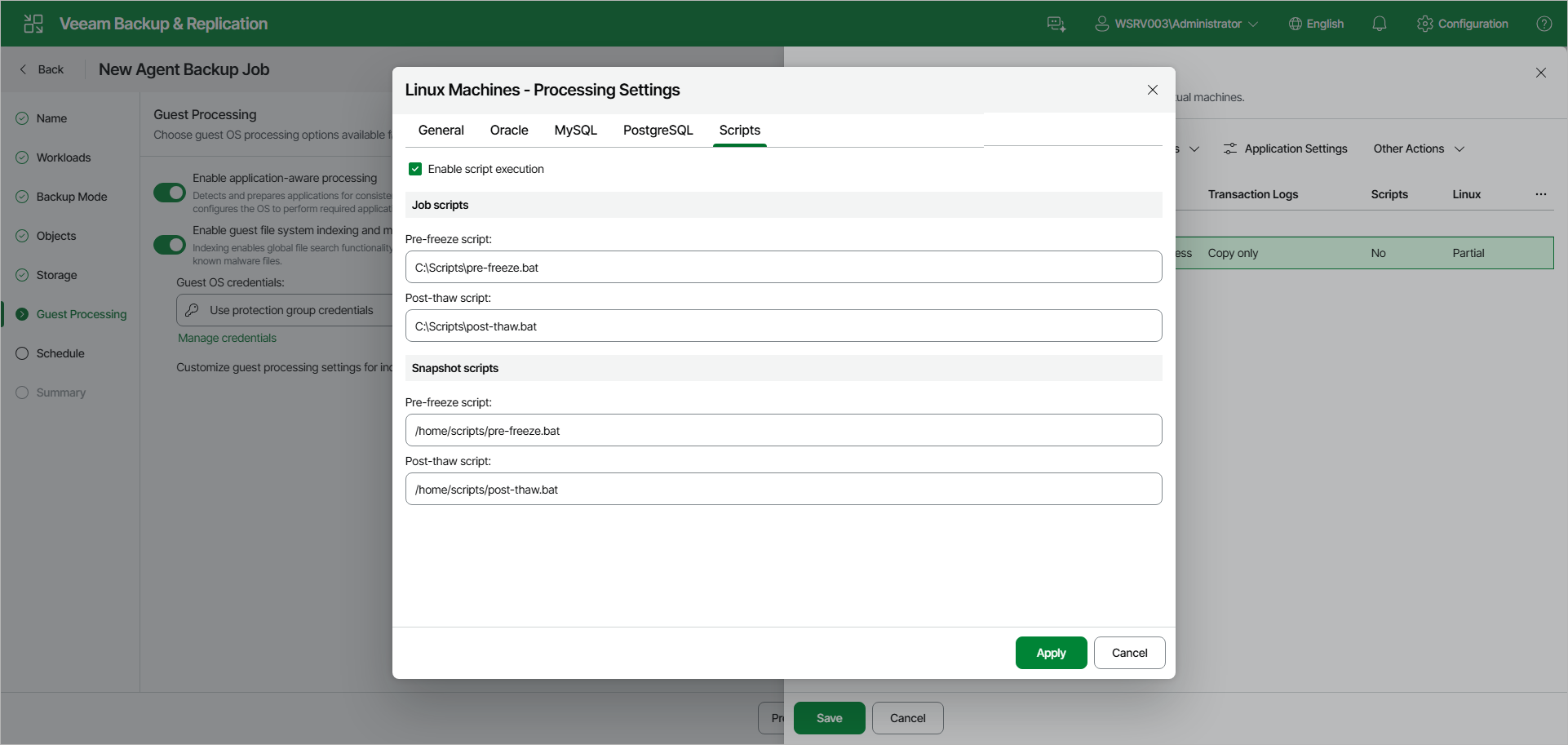
- In the Processing Settings window, open the Scripts tab.
- Select the Enable script execution check box.
- In the Job scripts section, specify paths to the executable files on the backup server. These scripts will run before and after the backup job session.
- In the Snapshot scripts section, in the Pre-freeze script and Post-thaw script fields, specify paths to the executable files on the Veeam Agent computer. These scripts will run before and after Veeam Agent for Linux creates a snapshot of the backed-up volume.
During the backup job session, Veeam Backup & Replication uploads the scripts to the /var/lib/veeam/scripts/<backup job ID>/<script type>/ directory on each Veeam Agent computer included in the backup job. Veeam Agent executes the scripts from the same directory under the root user.