Viewing Veeam Agent Backup Job Report
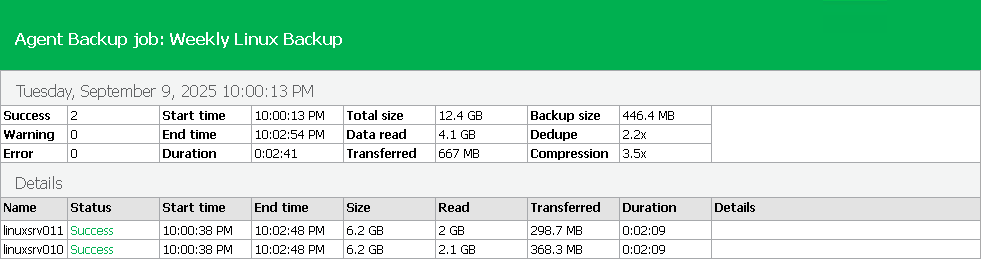
You can generate a report with details about Veeam Agent backup job session. The report contains data on the latest backup job session initiated for the job. To generate a report:
- Open the Home view.
- In the inventory pane, click the Jobs node.
- Depending on the backup job settings, do the following:
- If the backup job does not back up Microsoft SQL Server transaction logs, in the working area, select the necessary job and click Report on the ribbon or right-click the job and select Report.
- If the backup job backs up Microsoft SQL Server transaction logs, in the working area, select the necessary job and click Report > Instance Backup on the ribbon or right-click the job and select Report > Instance Backup.
For more information about backup of Microsoft SQL Server transaction logs, see Microsoft SQL Server Transaction Log Settings.
The report provides the following information on the latest job session:
- Cumulative session statistics: session duration details, details of the session performance, amount of read, processed and transferred data, backup size, compression and deduplication ratios.
- Detailed statistics for every protected computer processed within the session: processing duration details, backup data size, amount of read and transferred data, list of warnings and errors (if any).
|
NOTE |
|
[For Linux-based and Unix-based Veeam Agent computers] If the protected computer has LVM volume groups or BTRFS pools on top of physical partitions, during a full backup, Veeam Agent creates a separate disk in the backup file for each physical volume and each LVM volume group or BTRFS pool. As a result, the total data size in the report may appear larger than the actual volume of the physical partitions. |
|
TIP |
|
Consider the following:
|