Step 4. Configure Backup Destination Settings
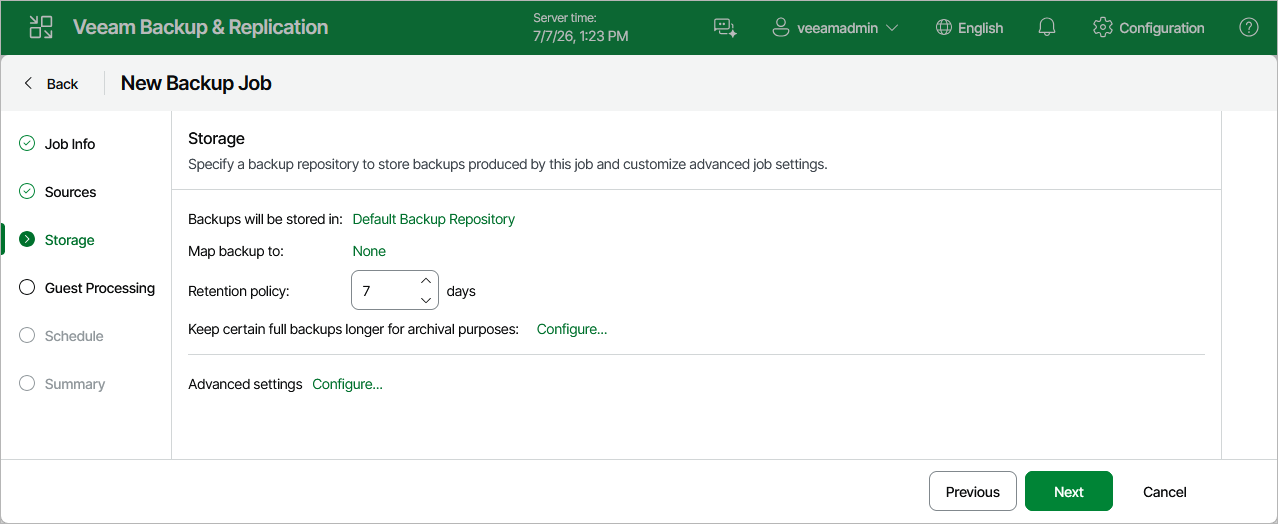
At the Storage step of the wizard, do the following:
- From the Backup repository drop-down list, select a backup repository where you want to store backups. For a backup repository to be displayed in the list of the available repositories, it must be added to the backup infrastructure.
When restoring data of backed-up VMs, Veeam Backup & Replication will offer you to choose a restore point from the list of all restore points available in the default backup repository. To allow Veeam Backup & Replication to detect restore points created for these VMs by other backup jobs or stored in other backup repositories, you can map these restore points to this backup job — this way, Veeam Backup & Replication will be able to continue existing backup chains and will transfer less data over network, reducing unwanted overhead for the production environment. To do that, click the link in the Map backup to field and choose the necessary backup.
- In the Retention policy section, choose how long Veeam Backup & Replication will keep restore points in a backup chain. If a restore point is older than the specified limit, Veeam Backup & Replication will remove it from the chain. For more information on how Veeam Backup & Replication tracks and removes redundant restore points, see Retention Policies.
Keep in mind that since every backup chain must contain at least 3 restore points, Veeam Backup & Replication may ignore the configured retention policy settings and retain restore points for longer periods of time. For more information, see Backup Retention.
Note |
If the UUID of a VM changes (for example, if the VM migrates to another cluster), Veeam Backup & Replication will be unable to continue the backup chain for this VM. After you re-add the VM to the backup job, Veeam Backup & Replication will start a new backup chain for it. However, you will still be able to perform restore operations using backups from the old backup chain. |
To help you implement a comprehensive backup strategy, Veeam Backup & Replication allows you to enable long-term retention policy for backups and to configure backup job advanced settings (for example, enable changed block tracking, plan backup maintenance and customize email notifications).