SMB (CIFS) Share
You can use SMB (CIFS) shares as backup repositories.
SMB Backup Repository Deployment
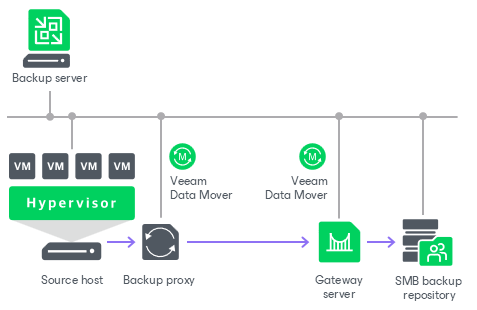
To communicate with an SMB backup repository, Veeam Backup & Replication uses two Veeam Data Movers that are responsible for data processing and transfer:
- Veeam Data Mover on the VMware or off-host backup proxy
- Veeam Data Mover on the gateway server
An SMB share cannot host Veeam Data Movers. For this reason, to communicate with the SMB share, you need to deploy a gateway server. Veeam Backup & Replication will automatically deploy a Veeam Data Mover on this gateway server. For more information on gateway server requirements and limitations, see Gateway Servers.
When any job addresses the SMB backup repository, Veeam Data Mover on the gateway server establishes a connection with Veeam Data Mover on the VMware or off-host backup proxy, enabling efficient data transfer over LAN or WAN.
If you plan to move VM data to an off-site SMB repository over a WAN link, it is recommended that you deploy an additional gateway server in the remote site, closer to the SMB repository.
Requirements for SMB Backup Repositories
Before you add an SMB backup repository to the backup infrastructure, check the following requirements and limitations:
- The role of an SMB repository can be assigned to a Microsoft Windows machine (physical or virtual). The machine must meet the system requirements. For more information, see System Requirements.
- The role of the gateway server for an SMB backup repository can be assigned to a Microsoft Windows or Linux server. For more information, see Gateway Servers.
-
The fast clone on ReFS volumes feature requires a Microsoft Windows gateway server.
- [For Veeam Software Appliance] If the backup server is not joined to the domain, the role of the gateway server for an SMB backup repository must be assigned to a domain-joined Microsoft Windows machine that belongs to the same domain as the SMB share or to a trusted domain.
Related Topics