Application Backup Policies
To back up InterSystems IRIS instances with Veeam Backup & Replication, you must configure an application backup policy. A backup policy defines which instances to protect, the target backup repository or storage snapshot location, and the schedule on which backups run. The policy can operate in one of the following modes:
- Backup mode — data is copied to a backup repository.
- Snapshot-only mode — only storage snapshots are retained on the storage system.
The policy does not process the journal files of the InterSystems IRIS instance, so point-in-time restore is not available in either backup mode. For details, see Backup Types.
For the application backup policy, all management tasks are performed on the Veeam Backup & Replication server side: Veeam Backup & Replication starts the policy according to the defined schedule, allocates backup infrastructure resources and orchestrates the snapshot and data-transfer operations. For more information, see How Application Backup Policy for InterSystems IRIS Instance Works.
To configure an application backup policy, launch the New Application Backup Policy wizard. For more information, see Creating Application Backup Policy.
How Application Backup Policy for InterSystems IRIS Instance Works
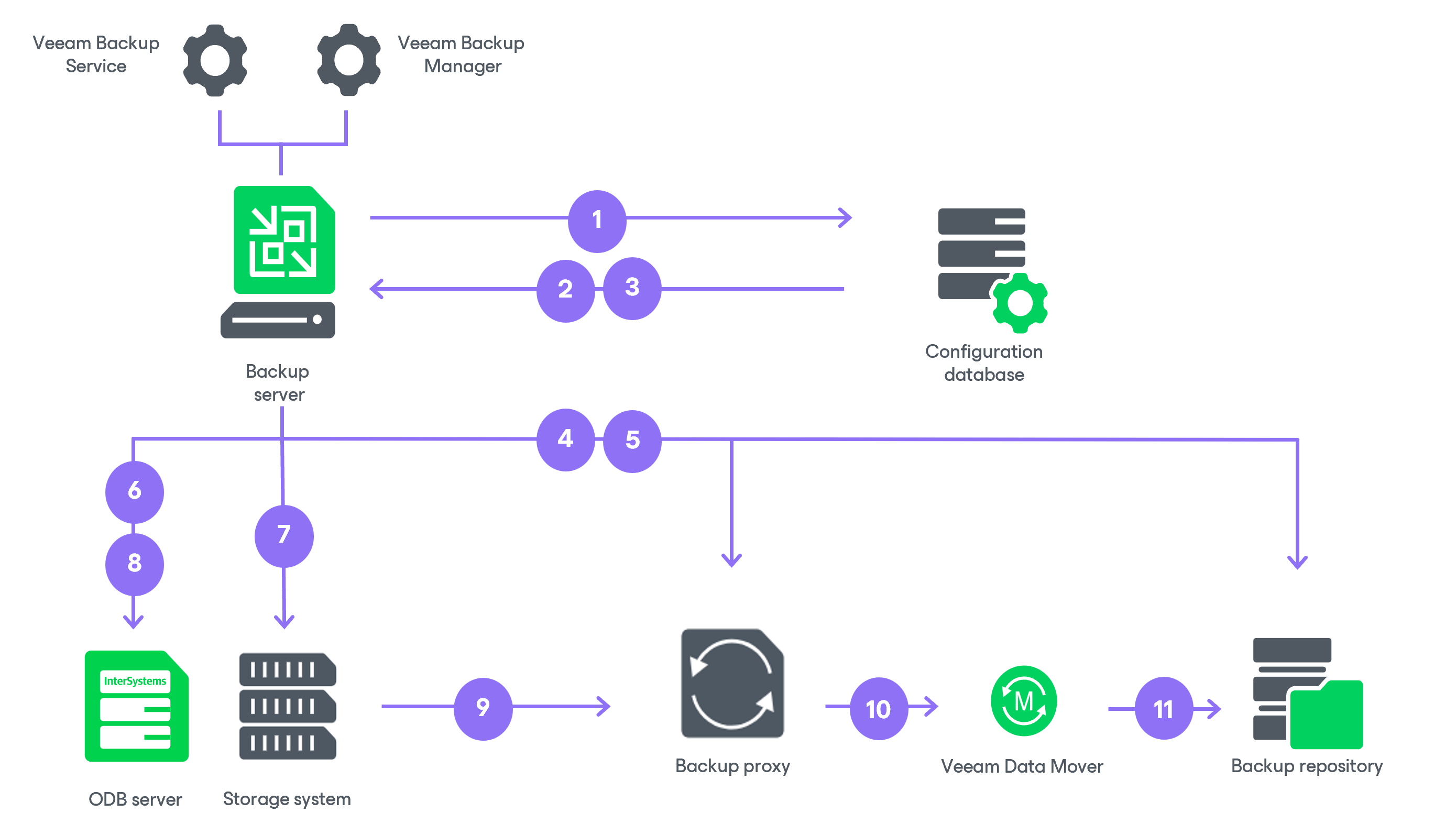
When you use an application backup policy to protect InterSystems IRIS instances, Veeam Backup & Replication performs backup in the following way:
- When you create an application backup policy in Veeam Backup & Replication, Veeam Backup & Replication saves the policy settings in its configuration database.
- Each time a backup policy session starts, Veeam Backup & Replication runs a topology rescan to match and update the list of InterSystems IRIS instances and their storage volumes against the configuration database, then reads the policy settings. For more information on the rescan, see Rescanning Protected ODB Server.
- Veeam Backup & Replication starts the Veeam Backup Manager process on the backup server. Veeam Backup Manager reads the policy settings from the configuration database and creates a list of tasks to process. Veeam Backup & Replication processes one task per InterSystems IRIS instance.
- Veeam Backup Manager connects to the Veeam Backup Service. The resource scheduler checks what backup infrastructure resources are available. To process the policy tasks, the resource scheduler assigns one or more Linux-based backup proxies and a backup repository specified in the storage settings of the application backup policy. For more information, see Specify Storage Settings.
- Veeam Backup Manager establishes a connection with the Veeam Transport Service on each Linux-based backup proxy and on the backup repository, and sets rules for data transfer, such as network traffic throttling rules.
- Veeam Backup & Replication connects to the Veeam Transport Service on the ODB server and instructs the InterSystems IRIS Plug-In to freeze the instance to a consistent state. The plug-in calls the ExternalFreeze method on behalf of the instance owner specified in the policy processing settings. Write activity is paused until the storage snapshot is created.
- Veeam Backup & Replication uses the Universal Storage API to instruct the storage system to create a storage snapshot of the volumes that hold the InterSystems IRIS instance data.
- Veeam Backup & Replication instructs the InterSystems IRIS Plug-In to thaw the instance. The ExternalThaw method is called and the instance resumes normal operation. All subsequent backup processing is performed against the immutable storage snapshot. For more information on InterSystems IRIS database processes, see the InterSystems IRIS Documentation.
What happens next depends on the backup mode configured in the policy:
- In snapshot-only mode, the storage snapshot is retained on the storage system according to the snapshot retention settings configured in the policy. No data is transferred to a backup repository and the policy session ends here.
- In backup mode, Veeam Backup & Replication proceeds with steps 9–11 to copy data from the snapshot to the backup repository.
- In backup mode, Veeam Backup & Replication uses the Universal Storage API to create a thin clone of the storage snapshot and exports it over SAN (iSCSI or Fibre Channel) to each Linux-based backup proxy.
- In backup mode, the source data mover on each Linux-based backup proxy mounts the snapshot clone and reads the data from the InterSystems IRIS instance volumes. The data is processed and transferred to the target data mover on the backup repository.
When the policy uses several backup proxies, Veeam Backup & Replication distributes the InterSystems IRIS database files between them. As a result, assigning more proxies allows to process multiple instances in parallel. As Veeam Backup & Replication cannot split a file between proxies, assigning more proxies also increases the processing rate for instances that contain many database files.
On the first run, a full backup is produced. On subsequent runs, Veeam Backup & Replication uses the changed block tracking (CBT) mechanism to read and transfer only the changed blocks inside the backup files, reducing the amount of data read and transferred. For details, see Backup Types.
- In backup mode, Veeam Backup & Replication stores the backed-up data in the backup file in the backup repository.