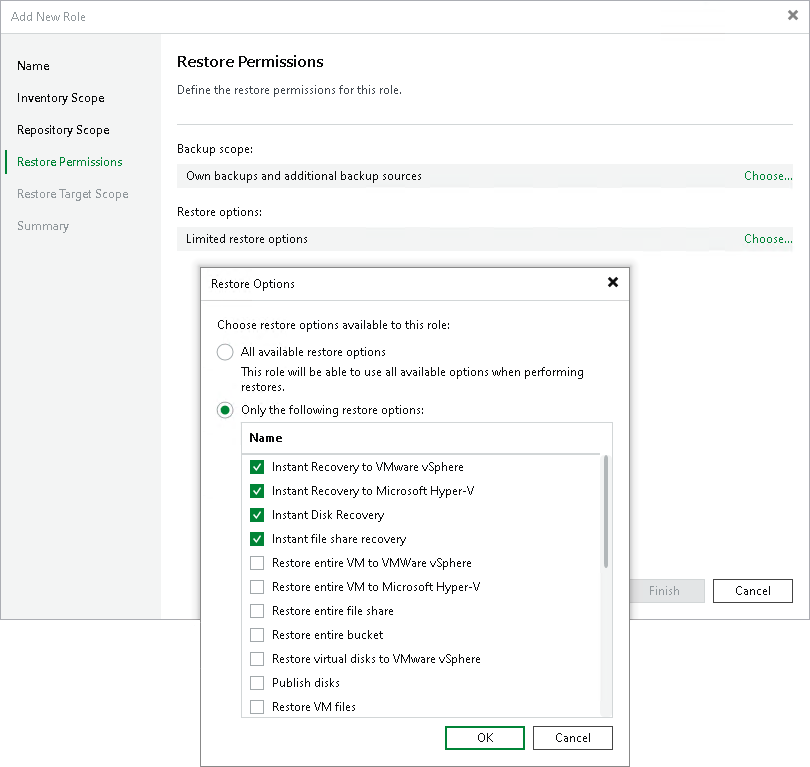
Step 5. Configure Restore Permissions
This step is available only if you selected the Manage restores check box at the Name step of the wizard.
At the Restore Permissions step of the wizard, specify which backups and restore types are available to users with this role. By default, users with this role can restore from all available backups and use all available restore options. To change the default settings, do the following:
- Next to Backup scope, click Choose and select one of the following options:
- All backups — allows restores from all supported backups, regardless of ownership.
- Only specific restore sources — restricts restores to the selected restore sources.
- Next to Restore options, click Choose and select one of the following options:
- All available restore options — allows all supported restore types.
- Only the following restore options — restricts restores to selected restore types. Select check boxes next to the restore types that you want to allow, for example, Instant Recovery to VMware vSphere or Microsoft Hyper-V.
For details on limitations of role-based access control, see Considerations and Limitations.