How Restoring Backups from Tape to Repository Works
You can restore machine or database server backups from tape to a backup repository and use the backup files for any further restore from disk scenario.
Restoring Machine Backups from Tape
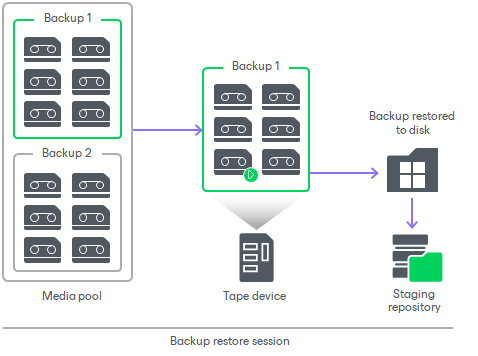
For restoring machine backups to a repository or a folder on disk, Veeam Backup & Replication performs the following steps:
- Veeam Backup & Replication checks the Backup Catalog in the configuration database to discover the tapes containing the required backup. If the tapes are offline, Veeam Backup & Replication will prompt you to insert the required tapes.
- The backup restore job locks one tape drive to process the restore of the whole backup.
- The tape drive loads the required tapes one by one, reads them and copies the backup data to the selected repository or folder.
- When the backup is copied, Veeam Backup & Replication registers it as an imported backup.
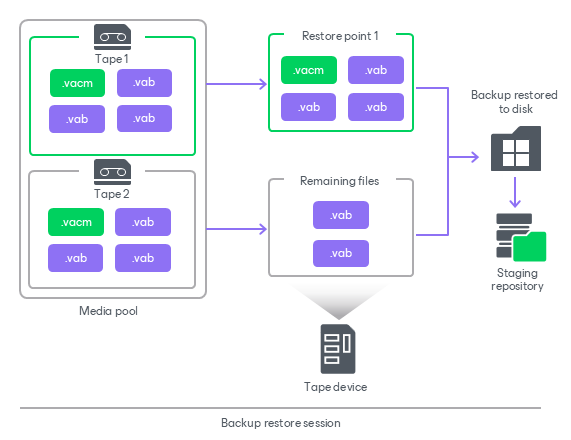
Restoring Veeam Plug-In Backups from Tape
For restoring Veeam Plug-In backups to a backup repository, Veeam Backup & Replication performs the following steps:
- Veeam Backup & Replication checks the Backup Catalog in the configuration database to discover the tapes containing the chosen restore point. If the tapes are offline, Veeam Backup & Replication will prompt you to insert the required tapes.
- The backup restore job locks one tape drive to process the restore of all files in the restore point.
- Once the files are restored and copied to the selected repository, Veeam Backup & Replication reads the backup job metadata file (VACM) to determine what other Veeam Plug-In backup files (VAB) must be restored to restore the source backup chain state at the moment of tape backup.
- Veeam Backup & Replication copies the remaining VAB files to the staging repository.
- Veeam Backup & Replication records the restored backup in the configuration database using the data from the VACM file. The restored backup is displayed under the Backups > Disk (Imported) node.