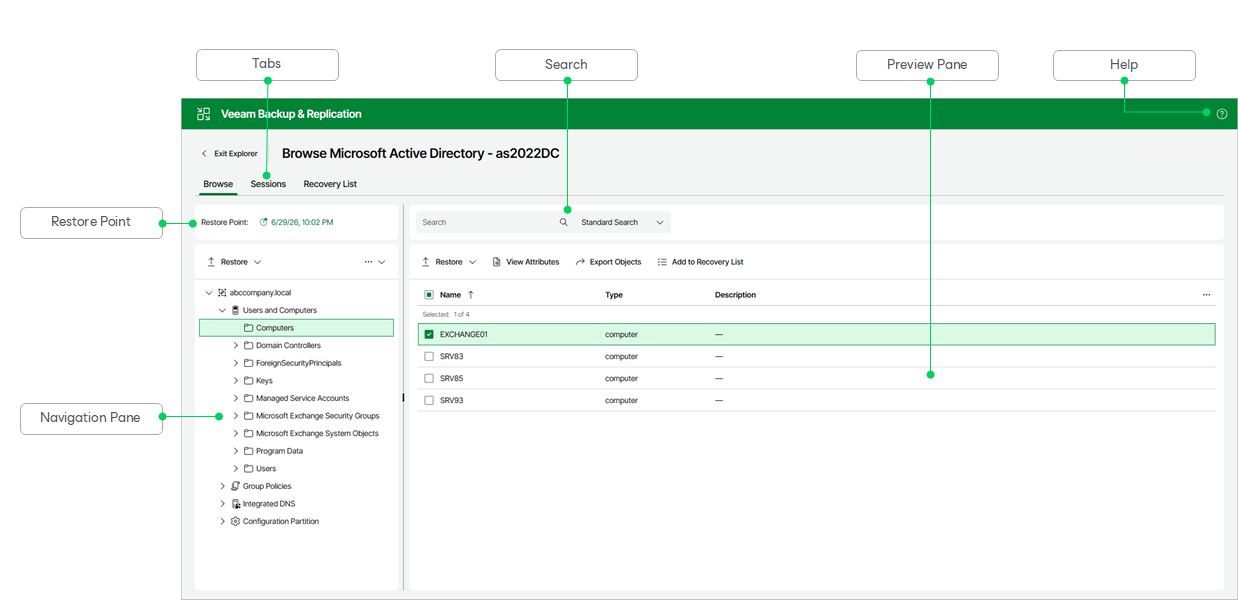
Getting to Know Explorer Web UI
Veeam Explorer for Microsoft Active Directory provides you with a convenient user interface that allows you to perform required operations in a user-friendly manner.
The main application window contains the following UI elements:
- The Browse tab, which allows you to browse the hierarchy of objects in the backup. This tab contains the following elements:
- The Restore Point field, which shows the restore point you are browsing. To browse a different restore point, click the date. For more information, see Selecting Restore Point.
- The navigation pane, which allows you to browse through the hierarchy of containers. In its upper section, the navigation pane contains commands you can apply to the selected container.
- The Search field, which allows you to search for objects in the selected container. For more information, see Browsing, Searching and Viewing Items.
- The preview pane, which shows the objects in the selected container. In its upper section, the preview pane contains commands you can apply to the selected objects.
- The Sessions tab, which allows you to view restore sessions. For more information, see Managing Restore Sessions.
- The Recovery List tab, which allows you to manage a list of objects that can be exported or restored. For more information, see Managing Recovery List.
- The Help button, which opens the online help.