Data to Back Up
Veeam Backup & Replication lets you back up the following types of VMware Cloud Director VMs:
- Regular VMs that are part of vApps
- Standalone VMs that were created in the VMware Cloud Director tenant portal
- Linked clone VMs that are associated with vApps
Backup of Regular and Standalone VMs
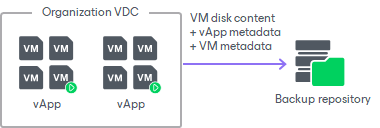
When you back up regular or standalone VMs, Veeam Backup & Replication captures and stores to the backup file the following data:
- VM disk content
- vApp metadata
- VM metadata
Backup of Linked Clone VMs
When you back up linked clone VMs, Veeam Backup & Replication captures and stores to the backup file the following data:
- Content of the template to which the VM is linked
- Content of the VM user disk — delta disk
- vApp metadata
- VM metadata
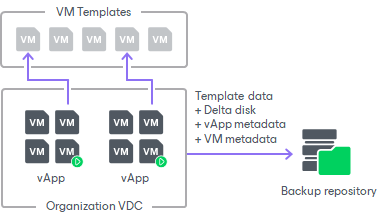
During full backup of linked clone VMs, Veeam Backup & Replication consolidates data of the VM template and delta disk and saves it as a regular VM disk in the backup file. Data merging guarantees proper VM restore: even if a VM template is lost by the time of recovery, you will still be able to restore the linked clone VM from the backup.
During incremental backup, Veeam Backup & Replication saves only changed data of the delta file.
Limitations for Backup of Linked Clone VMs
Before you back up linked clone VMs, consider the following:
- [For vCenter 6.5 or later] If you back up a linked clone VM that has snapshots, Veeam Backup & Replication may fail to produce a valid restore point. To overcome this issue, do one of the following:
- Disable CBT (Change Block Tracking) in the backup job settings.
- Ensure that CBT is enabled on the VM template to which the VM is linked.
For details on how to enable CBT on the VM template, contact Veeam Customer Support.
- Backup of linked clone VMs that were created by services other than VMware Cloud Director may cause snapshot-related problems. To overcome this issue, disable Veeam Snapshot Hunter. For details, see this Veeam KB article.