Rescan Job
For automated discovery of ODB servers and InterSystems IRIS instances, Veeam Backup & Replication uses the rescan job that runs on the backup server. Veeam Backup & Replication automatically creates this job when you create the protection group. The rescan job runs on the schedule defined individually for each protection group. By default, Veeam Backup & Replication performs discovery at 9:00 PM daily. You can adjust the daily schedule or switch to a periodic schedule in the protection group settings.
The rescan job is not listed among backup jobs in the Veeam Backup & Replication console. However, you can start and stop rescan job sessions manually for a specific protection group. For details, see Rescanning Protection Group.
You can view statistics for currently running and completed rescan job sessions. You can also view rescan job sessions from the Home view, in the Last 24 Hours node. This method works only for sessions completed within the past 24 hours. For details, see Viewing Rescan Job Statistics.
An ODB server can host one or more InterSystems IRIS instances, and each instance can manage one or more databases. Veeam Backup & Replication protection operates at the instance level: the rescan job discovers instances, and an application backup policy backs up whole instances rather than individual databases within them.
How Rescan Job Works
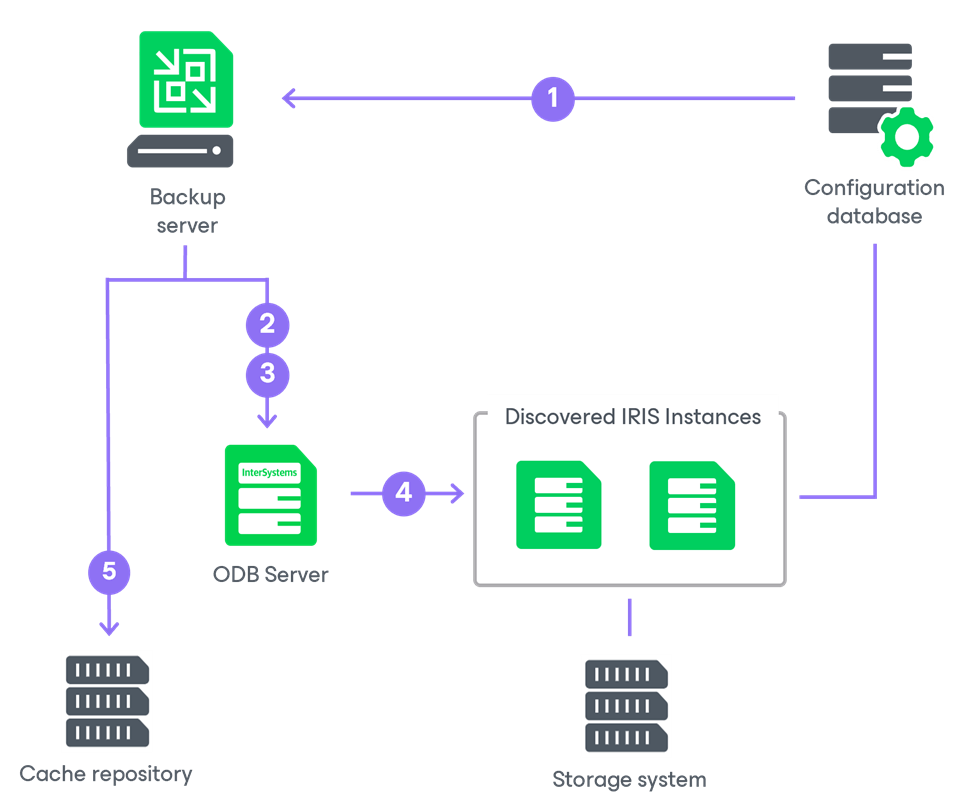
When the rescan job starts, Veeam Backup & Replication performs the following operations:
- Reads the list of ODB servers to scan and the credentials for connecting to them from the protection group settings on the configuration database.
- Connects to each ODB server over SSH using the account specified in the protection group settings. If the Veeam Deployment Kit was installed on the ODB server in advance, Veeam Backup & Replication instead connects to the pre-installed Veeam Deployer Service using a certificate, without SSH or a stored account. Veeam Backup & Replication then checks which Veeam components are already installed on the server.
- Deploys Veeam components on each newly discovered ODB server. As part of this process, Veeam Backup & Replication performs the following:
- Copies the Veeam Transport Service binaries to the ODB server and installs them over SSH, or using the Veeam Deployment Kit. For details, see Deploying Veeam Components for Certificate-Based Authentication.
- Copies and installs the TLS certificate. Veeam Backup & Replication uses this certificate for subsequent connections to the ODB server.
- Copies and installs the InterSystems IRIS Plug-In. The plug-in extends the Veeam Transport Service with the capability to interact with InterSystems IRIS instances, enabling listing instances, collecting topology, and performing freeze and thaw operations during backup.
Veeam Backup & Replication can discover InterSystems IRIS instances only after the plug-in is installed. For this reason, component deployment precedes instance discovery.
|
NOTE |
|
If a new ODB server is added to an existing protection group, you must edit the protection group and rescan it to deploy the components on the new server. For details, see Editing Protection Group Settings and Rescanning Protection Group. |
- Discovers the InterSystems IRIS instances and their storage volumes on each ODB server. The plug-in collects the instance topology: the list of InterSystems IRIS instances on the server, the paths to their configuration and data files, and the storage volumes and block devices that hold the instance data. During this step, Veeam Backup & Replication performs the following:
- Lists InterSystems IRIS instances on the ODB server and obtains the paths to the instance configuration files.
- Extracts data volume paths from each configuration file.
- Reads the IRISFeatureTracker file, if present, to obtain a stable instance GUID. If the file is not present, the combination of instance name and BIOS UUID is used to identify the instance.
- For each data path, resolves the block device hierarchy down to the raw block device, RDM or physical disk.
- Matches the resolved devices against the information returned by the storage system rescan operation to confirm that the instance volumes reside on a registered Universal Storage API storage system. If a volume cannot be matched, that instance is not added and the rescan operation fails.
- Writes the discovered instance information to the configuration database, making the instances available for selection in an application backup policy.
The InterSystems IRIS Plug-In returns the topology to the backup server in .xml format over the Veeam Communication Protocol (VCP).
- Updates the cache repository used to store the CRC tree structure of the source instance file system. The cache enables incremental processing during subsequent backup sessions.